



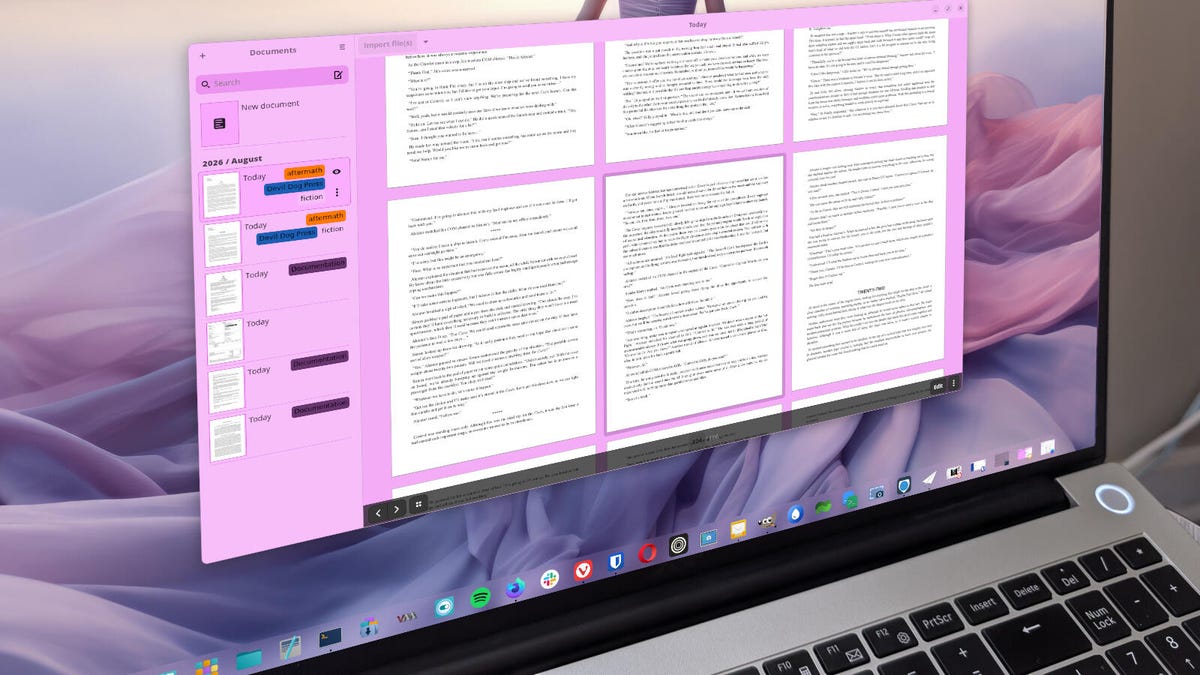
# Paperwork: The Open-Source Document Organizer That Keeps Your Files in Order
## Why Document Organization Matters
For anyone who works with digital files — whether you’re a writer, researcher, student, or business professional — managing hundreds or even thousands of documents can quickly become overwhelming. Manually sorting through files, trying to remember which folder holds that one critical report, or scanning document names hoping to stumble upon the right file is an exercise in frustration.
The solution? A dedicated document management tool that streamlines the entire process. One such tool that has gained a loyal following is **Paperwork** — a free, open-source application designed to help you tag, label, search, and organize all of your digital documents with ease.
## What Is Paperwork?
Paperwork is a local document management application that lets you import, tag, label, and search through your files without ever uploading them to a third-party server. It supports a wide range of document formats, including PDF, DOCX, ODT, and more, making it versatile enough to handle nearly any type of file you encounter in your daily workflow.
The app is available for Linux distributions and Windows, though it is not currently offered for macOS users. Its clean, intuitive interface makes it accessible to beginners while offering enough depth to satisfy power users who need advanced organization features.
## Core Features That Set Paperwork Apart
### Powerful Tagging and Labeling System
One of Paperwork’s standout capabilities is its ability to assign keywords and labels to documents. After importing your files, you can open each document’s properties panel and add as many tags as you need. You can even customize the colors of your keywords, which makes scanning through your organized library visually intuitive.
This tagging process, while manual, is well worth the effort. Once your documents are properly labeled, searching becomes remarkably fast and precise.
### Intelligent Search Capabilities
Search is arguably Paperwork’s greatest strength. The tool doesn’t just search by file name — it can also scan the contents of your documents for specific strings of text. Imagine you have a large collection of books or reports and you need to find the one that mentions a particular term or phrase. Paperwork can highlight those words directly within the document, saving you from opening file after file.
You can further refine your searches by filtering through labels, dates, and keywords simultaneously. This multi-criteria search approach is especially valuable for users with large document collections who need to narrow results quickly.
### Auto-Detection and OCR Support
Paperwork includes several smart features out of the box. It can automatically detect page orientation in scanned documents, support optical character recognition (OCR) for making scanned PDFs searchable, and even suggest labels to apply to newly imported documents.
The auto-labeling feature, however, isn’t perfect. Users may find that the automated suggestions don’t always align with their actual document categories, but these labels can be easily edited or removed through the properties panel.
### Scanner Integration
For those who deal with physical documents, Paperwork offers built-in scanner support, allowing you to digitize paperwork and immediately integrate it into your organized library.
## How to Get Started with Paperwork
### Importing Your Documents
Since Paperwork operates entirely offline, you don’t need to worry about data privacy or cloud storage dependencies. To begin organizing your files:
1. Click the Import File(s) button
2. Your file manager will open, allowing you to navigate to the directory containing your documents
3. Select the files you want to add (you can multi-select by holding Ctrl)
4. Click Open — Paperwork will copy these files into its own directory without altering the originals
### Organizing and Tagging
Once your documents are imported, go through them and add relevant keywords and labels through the document properties panel. This upfront investment of time pays dividends the moment you need to locate a specific file later.
### Installing Paperwork
**On Windows:** Download the installer from the official website, run it, and follow the installation prompts.
**On Linux:** You have several installation options depending on your distribution:
– Use your distribution’s built-in package manager (both GUI and command-line options are available)
– Install via Flatpak for a universal package experience
– Use command-line tools for specific distributions like Arch, Debian/Ubuntu, or Fedora
Flatpak is generally recommended for its simplicity and ease of updates. After installation, you can find the Paperwork launcher in your desktop application menu.
## Who Should Use Paperwork?
Paperwork is ideal for anyone who:
– Manages a large collection of digital documents
– Values privacy and local-only storage
– Needs powerful full-text search capabilities
– Wants a free, open-source solution for document management
– Works across Linux or Windows environments
It may not be the best choice for users who need cross-platform support across macOS, or those who require cloud-based synchronization with mobile devices.
## FAQ
**Is Paperwork really free?**
Yes, Paperwork is completely free and open-source. There are no hidden fees, premium tiers, or feature restrictions.
**Can I use Paperwork on a Mac?**
Unfortunately, Paperwork is not currently available for macOS. It is supported on Linux distributions and Windows only.
**Does Paperwork upload my documents to the cloud?**
No. Paperwork is a local-only application. All your documents remain stored on your device, and nothing is uploaded to any external server.
**What file formats does Paperwork support?**
Paperwork supports a wide variety of formats including PDF, DOCX, ODT, and many others. It also has built-in scanner support for digitizing physical documents.
**Is the auto-labeling feature reliable?**
The auto-labeling feature can be hit or miss. It tends to work better with certain document types than others. Most users find it helpful as a starting point but still prefer to manually review and adjust labels.
**Can I search within the body of a document?**
Yes, one of Paperwork’s strongest features is its ability to perform full-text searches within documents, not just by file name or metadata.
**Does Paperwork support multiple languages?**
Yes, Paperwork offers localization support and can be installed with language packs on most Linux distributions.
## Conclusion
Paperwork is a remarkably effective tool for anyone struggling to keep their digital document collection under control. Its combination of tagging, labeling, full-text search, and multi-criteria filtering makes it a powerful yet lightweight solution for document organization. The fact that it’s free, open-source, and privacy-focused adds tremendous appeal for users who value data sovereignty.
While the auto-labeling feature could use some refinement and macOS support is noticeably absent, the overall package delivers an excellent user experience that far outweighs these minor drawbacks. Whether you’re a writer managing manuscripts, a professional organizing reports, or a student cataloging research materials, Paperwork offers a straightforward path to a well-organized digital workspace.
Thank you for reading
