



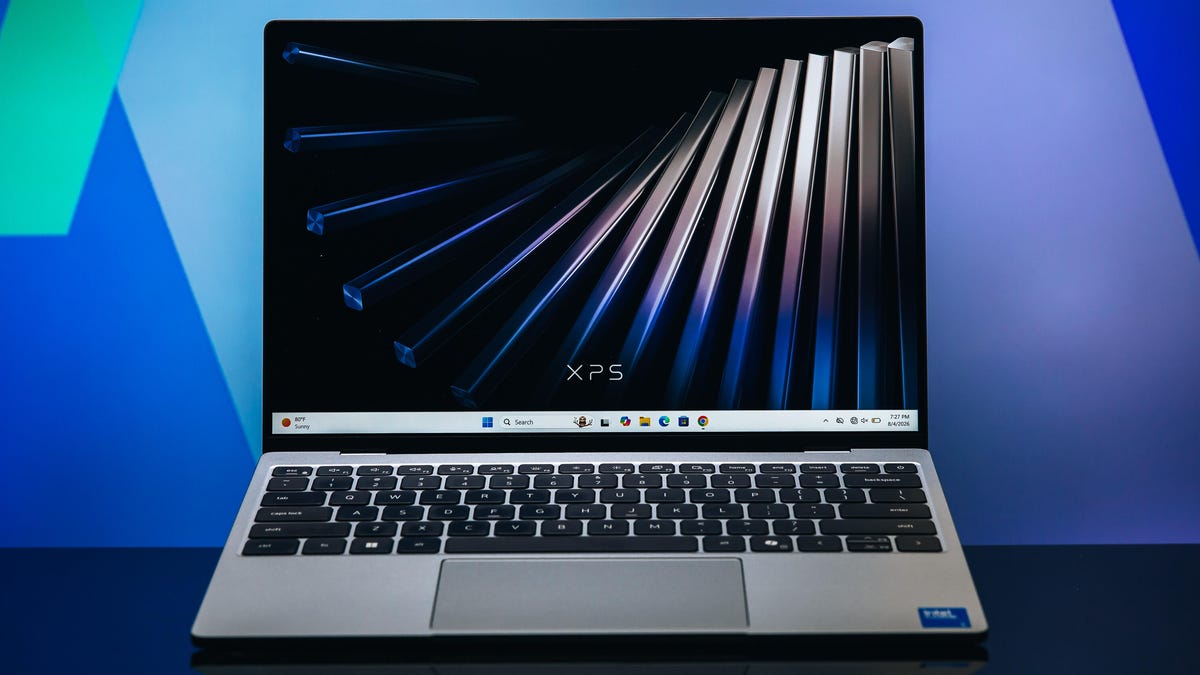
**A Comprehensive Review: Dell’s XPS 13 vs. the Competition**
In the competitive world of budget laptops, Dell’s latest XPS 13 emerges as a formidable contender. Designed with the explicit goal of challenging Apple’s budget-friendly MacBook Neo, the XPS 13 doesn’t just aim to compete—it aims to set a new standard for what a “budget” Windows laptop can be. The question on many minds is whether it successfully dethrones the MacBook Neo. The answer, however, is nuanced. While it may not completely overthrow Apple’s champion, the XPS 13 absolutely forces the competition to raise the bar, offering a premium experience at a price point that shakes up the market.
### **Build and Design: A Masterclass in Minimalism**
**Review Score: 4/5**
From the outset, the XPS 13 impresses with its design philosophy. It’s a laptop that succeeds on its own merits, regardless of the Apple comparison. Dell has clearly taken to heart its recent acknowledgment of past branding missteps, delivering a product that aligns with its promise of “no compromises” in construction.
The 13.4-inch IPS display is the star of the show. With a 120Hz refresh rate, 500 nits of brightness, and a 2.5K (2560 x 1600) matte finish, it’s a screen that punches well above its weight. The matte finish is a crucial differentiator, effectively combating glare that plagues many glossy-screened competitors. The display is also sufficiently vibrant, boasting 100% of the DCI-P3 color spectrum and surprisingly supports touch input.
Physically, the XPS 13 is a triumph of engineering. It is both thinner and lighter than the MacBook Neo, tipping the scales at just 2.2 pounds. It also boasts a slightly smaller footprint, making it an ideal companion for students and professionals on the move.
The build quality feels anything but budget. The chassis is airtight, with no cheap-feeling plastics. The keyboard is a particular highlight, offering satisfying 0.8mm of key travel—responsive and tactile without the distracting loudness associated with many Windows laptops. It’s also fully backlit and, in a thoughtful move aimed at its student demo, operates in complete silence. The trackpad is large, responsive, and feels premium under the finger.
Connectivity remains minimalistic, adhering to a “less is more” approach. You’ll find two USB-C (10Gbps) ports, one on each side, supporting both power delivery and DisplayPort functionality. This mirrors the port selection found on many high-end machines, prioritizing versatility and future-proofing over sheer quantity.
### **Hardware and Performance: Where Compromises Are Made**
**Review Score: 3/5**
This is where the XPS 13’s true nature is revealed. While the exterior is stellar, the interior tells a story of strategic cost-cutting to achieve an affordable price. The laptop is powered by an Intel Core 5 or 7 processor from the “Wildcat Lake” series, a chip line specifically designed for low-cost, battery-efficient devices where raw power is a secondary concern.
This choice directly impacts performance. The biggest caveat is the base model’s 8GB of RAM. In the world of Windows, 8GB is a challenging starting point. While it technically “works,” it doesn’t function the same way it does on a Mac. We’ve seen firsthand that 16GB is the true sweet spot for most users. With 8GB, users will encounter the limitations of Windows: UI components can behave erratically, applications may close unexpectedly, and there will be noticeable delays between input and action.
For context, the MacBook Neo with the same 8GB of RAM feels significantly more capable. The Neo is higher-performing at the entry level, though it is capped at 8GB. The XPS 13 counters this by offering configurations with 16GB and even 32GB of RAM, jumping up to $899. This moves it firmly out of the “budget” category and into premium territory. For users who stick to the base model, the XPS 13 is best suited for core tasks: browsing, streaming video, working in Microsoft 365, and perhaps some casual gaming. It’s a device defined by its purpose.
The performance limits become most apparent when Chrome tabs start to pile up. Once you exceed 30 tabs, the system begins to strain, leading to significant delays in navigation and app switching. The message is clear: to get the most out of this hardware, you must keep your workflow lean.
### **Value and the Verdict: An Elegant Statement**
**Review Score: 4/5**
When judged on value, the XPS 13 is a resounding success. It nails the “bang for buck” metric by hitting all the right notes in its class. It delivers a premium experience—a great build, a beautiful display, and excellent battery life—for a price that is undeniably attractive.
Its main drawbacks are tied to longevity. The 8GB RAM configuration, while acceptable today, may feel limiting in two or five years as software demands continue to grow. The same goes for the ultra-thin profile, which, while elegant, raises questions about its resilience against the inevitable bumps and drops of daily life, especially in a campus environment.
Ultimately, the XPS 13 is not about dethroning a king; it’s about offering an incredibly compelling alternative. It is one of the best Windows laptops in its price range, hands down. It successfully raises the bar for competing “budget” devices, proving that you don’t have to spend thousands to get a laptop that feels special. While a machine like the Acer Aspire 14 might offer better raw performance for the money, the XPS 13’s superior display and overall elegance make it an easy sell for those who value design and a true XPS experience. For these reasons, it earns a well-deserved spot as an Editors’ Choice Award winner.
—
### **Frequently Asked Questions (FAQ)**
**Q1: What are the main pros of the Dell XPS 13?**
* **A:** The XPS 13 boasts a gorgeous, premium build, an excellent and vibrant 2.5K display with a 120Hz refresh rate, very thin and light portability, a high-quality silent keyboard with good travel, and a trackpad that feels responsive and large. Its battery life is also a standout feature.
**Q2: What are the main cons of the Dell XPS 13?**
* **A:** The primary con is its base configuration of 8GB of RAM, which is limiting on a Windows 11 PC and can lead to performance hiccups and glitches. It also only features two USB-C ports, which may be restrictive for some users needing more connectivity.
**Q3: Is the Dell XPS 13 a good replacement for the MacBook Neo?**
* **A:** It is one of the best competitors and a fantastic alternative. While it doesn’t outperform the Neo in raw speed, especially with 8GB of RAM, it offers a superior display, a more premium feel, and a thinner, lighter design. It successfully raises the bar for budget Windows laptops in a way the Neo doesn’t.
**Q4: How does the performance of the XPS 13 with 8GB RAM compare to the MacBook Neo with 8GB?**
* **A:** The MacBook Neo performs better with 8GB of RAM. The XPS 13 feels hampered by Windows at this memory level, leading to more noticeable lag, app instability, and UI glitches compared to the smoother experience on the Neo.
**Q5: Who is the Dell XPS 13 best for?**
* **A:** It is ideal for users who prioritize design, portability, and display quality for everyday tasks. This includes students, frequent travelers, and office workers whose main activities are web browsing, using cloud-based apps like Microsoft 365, media consumption, and light gaming. Users who need heavy multitasking or demanding applications should opt for the higher RAM configurations.
—
### **Conclusion**
The Dell XPS 13 is a landmark release in the budget laptop segment. It is a device that masterfully balances aspiration with accessibility. While its entry-level 8GB RAM configuration highlights the performance gap between Windows and macOS, the laptop’s core strengths—its stunning display, superb build quality, and exceptional portability—are undeniable. It doesn’t just compete with the MacBook Neo; it challenges the entire definition of a “budget” Windows PC. For buyers seeking a premium-feeling, highly portable laptop without breaking the bank, the XPS 13 is not just a worthy contender—it is currently the standard-bearer in its class.
