




Enterprise storage migrations involve far more than simply transferring data. The real challenge lies in safeguarding business operations, sustaining performance, controlling costs, and instilling confidence in teams—especially when terabytes or petabytes of data underpin mission-critical applications.
Building that confidence becomes particularly difficult when migration planning is disjointed. Many organizations still depend on a mix of custom scripts, third-party utilities, and siloed workflows to evaluate environments, relocate data, and maintain system alignment throughout the transition. This often leads to missed timelines, unnecessary disruptions, and teams stretched thin trying to keep essential workloads online.
An effective migration strategy begins with recognizing that not all data is the same—and each type demands a tailored approach:
- Certain workloads require careful dependency mapping and sequencing before any data can be moved.
- Some datasets are simply too massive to transfer efficiently over a network connection.
- Specific file systems must stay in sync while day-to-day business operations continue uninterrupted.
- Other data needs to arrive in Azure already positioned to enable modernization efforts like analytics, AI, or application transformation.
In this post, we’ll guide you through the full lifecycle of an Azure Storage migration—from initial planning to final execution:
- How Azure Migrate and the Azure Copilot Migration Agent can assist with environment assessment and strategic decision-making.
- How to choose the most suitable Microsoft first-party migration tool for your scenario.
- How Azure Storage Mover and Azure Data Box address online, offline, and phased migration needs across real-world customer environments.
Tool overview
Azure Migrate: A unified platform for migration discovery, assessment, and planning.
Azure Copilot Migration Agent: An AI-driven extension for Azure Migrate that simplifies storage migration decisions (currently in preview).
Azure Storage Mover: A free, fully managed tool for online migration and synchronization of file and object data.
Azure Data Box: A secure offline transfer solution designed for large-scale or bandwidth-limited datasets.
1. Azure Storage migration planning: Build your data migration strategy
Before choosing a migration tool, organizations must first gain a clear picture of what they’re moving, how their systems interconnect, which workloads pose the greatest risk, and what the target architecture needs to support.
Azure Migrate serves as a centralized hub for migration discovery, assessment, business case development, dependency analysis, and planning. It enables teams to uncover infrastructure and workloads, gauge Azure readiness, estimate costs, map dependencies, and coordinate migration activities across on-premises and multicloud environments. For customers migrating servers, applications, databases, or interdependent workloads to Azure, this establishes the strategic foundation required to make well-informed decisions before any migration work begins.
Azure Copilot Migration Agent: Preview and benefits
To bridge the gap between planning and execution, the Azure Copilot Migration Agent extends Azure Migrate with new Azure Storage integration, now available in preview. Rather than requiring teams to interpret assessment results on their own and manually translate them into a storage migration plan, this guided, AI-powered experience leverages Azure Migrate project data to help evaluate storage options, match workloads with the most appropriate Azure storage services, and recommend the best execution tool—whether that’s Azure Storage Mover, Azure Data Box, or another Azure storage migration approach. The outcome is a faster, more seamless path from discovery to decision, helping teams reduce ambiguity and move into execution with greater assurance.
With that foundation in place, teams can then focus on storage-specific decisions. Azure Storage migration guidance follows a structured, phased approach:
- Evaluate the source environment.
- Choose the appropriate Azure Storage target.
- Define the migration strategy.
- Select the migration tool.
- Execute the migration.
This order is important because the tool should be chosen based on the data requirements and destination architecture—not the reverse.
The objective isn’t to funnel every migration through a single process. It’s to apply the right Microsoft solution at the right point in the journey.
Ideally, tool selection happens only after assessment, target selection, and migration strategy are defined. At
At this point, companies need to grasp what they’re transitioning, its final destination, and the method for getting there. The choice should be driven by the amount of data involved, available network capacity, acceptable downtime, synchronization requirements, application interdependencies, and whether the migration will happen while systems remain active, during a complete shutdown, or in stages.
3. Cloud data migration: Online and continuous migration with Azure Storage Mover
Azure Storage Mover provides complimentary, fully managed online data transfer and synchronization for both file-based and object-based data. It excels in large-scale, recurring migrations that require coordinated, overseen, and monitored data movement across networks—whether that involves migrating from on-premises data environments or moving between cloud providers, such as transferring from AWS S3 to Azure Blob Storage.
Azure Storage Mover works best for:
- Online transfers and incremental sync from on-premises data environments.
- Cloud-to-cloud data transfers, including moving from AWS S3 to Azure Blob.
- Data relocation within Azure itself, such as copying between blob containers. As businesses weigh costs, performance, and adaptability across different cloud platforms, being able to shift data between providers shifts from a mere technical function into a strategic asset. Azure Storage Mover enables teams to transition their data holdings from AWS S3 to Azure Blob Storage without causing unnecessary interruptions to access or needing to rebuild the entire migration workflow from scratch.
- Large-scale datacenter shutdowns and hybrid cloud transformations.
- Driving AI and machine learning through high-volume data ingestion.
- Safeguarding and maintaining large backup and media archives.
- Upgrading healthcare and mission-critical data infrastructures.
- Enabling secure transfers for government and regulated industries.
- Supporting enterprise analytics and modern data platforms.
Although Storage Mover facilitates smooth, large-scale data transfers from AWS S3, customers frequently also need to migrate and update the applications that interact with that data. To help with this, a newly available Copilot skill (currently in preview) now supports application migration, providing a more comprehensive, full migration journey from start to finish.
If you’d like to try the S3 application migration skill alongside your data transfer, reach out to us at AzStorageMigration@microsoft.com.
Every feature currently offered by Azure Storage Mover is free to use. Normal storage, transaction, and network fees still apply.
4. Offline data migration: Azure Data Box for large-scale transfers
Azure Data Box enables offline transfer of large or bandwidth-limited datasets. It is particularly valuable when network capacity or operational limitations make online transfer unworkable, or when organizations need to speed up the initial bulk load before subsequent synchronization or final switching.
Azure Data Box is best suited for:
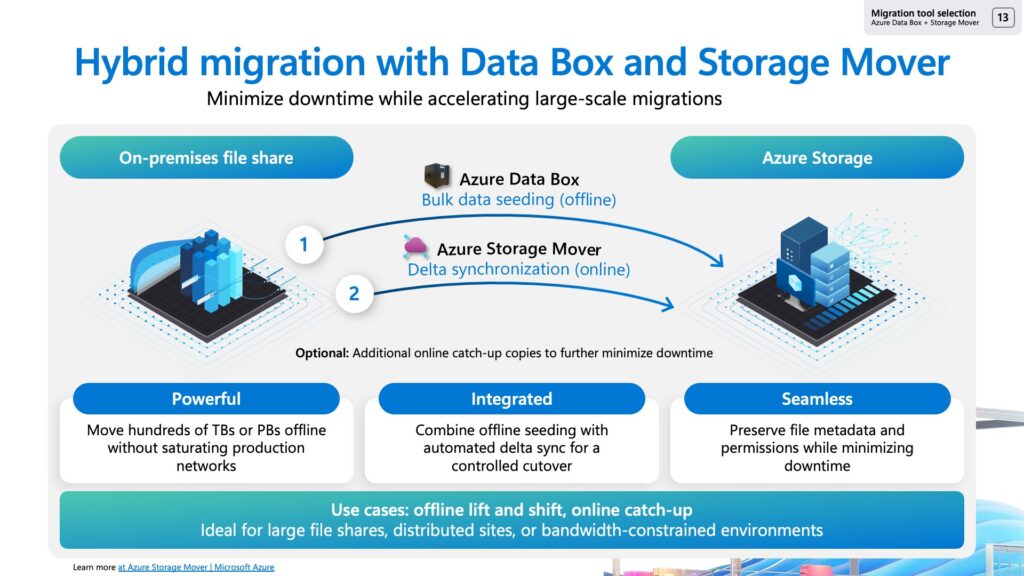
Data Box allows high-speed transfers directly into Azure datacenters, lessening reliance on network performance and assisting teams with meeting migration deadlines when bandwidth is scarce. It also fits into staged approaches, where Data Box manages the heavy initial transfer and online tools take over for ongoing synchronization or cutover.
5. Real-world migration scenarios: Hybrid cloud, AI, and more
The majority of migration projects involve multiple constraints at once. Teams often juggle scale, connectivity, compliance requirements, allowable downtime, budget targets, and modernization objectives simultaneously. The strength of Azure’s approach becomes apparent when these tools are combined.
Datacenter exit and hybrid cloud expansion
When it comes to datacenter exits and expanding into hybrid cloud setups, businesses typically face the challenge of moving large, diverse environments under tight schedules with little room for disruption. Azure Migrate can assist with uncovering dependencies and ordering workload transfers. Azure Data Box can speed up bulk data movement regardless of network limitations. Azure Storage Mover can handle synchronization and the final cutover. This combination enables teams to perform staged migrations, confirm that workloads are functioning properly before switching over, and shut down old infrastructure on time.
The effectiveness of datacenter exit strategies is evidenced by successful customer migrations that have already been carried out.
For instance, Copeland leveraged Azure Data Box to move over 300 terabytes of data to Azure during a critical datacenter transition, ensuring business operations remained uninterrupted.
AI and machine learning data readiness
To prepare for AI and machine learning initiatives, organizations must centralize and continuously refresh large volumes of high-quality data. Azure Data Box facilitates the swift ingestion of massive training datasets, research archives, or historical records. Azure Storage Mover supports ongoing synchronization and pipeline updates, keeping data up to date for model training, experimentation, analytics, and AI development.
Backup, media archives, and long-term retention
When it comes to backups, media archives, and long-term retention, organizations need to transfer large volumes of rarely accessed data while ensuring durability, accessibility, and cost efficiency. Azure Data Box enables efficient movement of extensive archival datasets, and Azure Storage tiers help optimize costs over time. Azure Storage Mover supports post-migration workflows where continued access or updates are necessary.
The WNET Group’s media archive modernization exemplifies this approach. By using Azure Data Box, WNET migrated roughly 3.6 petabytes of content—over 800,000 hours of media—to Azure. This transition allowed them to exit their datacenter while keeping broadcast operations running smoothly, cut asset retrieval times from up to 24 hours down to under four hours, and laid the groundwork for leveraging machine learning to enrich metadata and enhance content discovery.
Healthcare, regulated, and mission-critical systems
In healthcare and other regulated industries with mission-critical systems, migration must balance security, compliance, governance, and operational continuity. Azure Migrate helps assess dependencies and supports controlled sequencing. Azure Data Box enables offline transfer for large, sensitive datasets. Azure Storage Mover supports incremental updates where continuous synchronization is needed.
Astellas Pharma used Azure Data Box to transfer a 500-terabyte local file share to Azure, meeting a six-month migration deadline that enabled the closure of six global datacenters. For regulated industries, this demonstrates how offline transfer allows organizations to move swiftly while maintaining control and continuity over critical data.
From migration execution to modernization outcomes
Migration itself is not the end goal—it’s the foundation for what comes next.
Once data is established in Azure, organizations can expand into analytics, artificial intelligence, and cloud-native architectures.
By combining Azure Migrate, Azure Storage Mover, and Azure Data Box, organizations gain a migration strategy that addresses real-world challenges while positioning data for long-term value.
Get started with Azure Storage migration solutions
Discover Azure Storage and data migration solutions to build a migration strategy tailored to environment, timelines, and modernization objectives.
