


Tuesday, June 16

    Show Expert Take Show less

    VPN router

    Price

    Built-in VPN?

    Speed

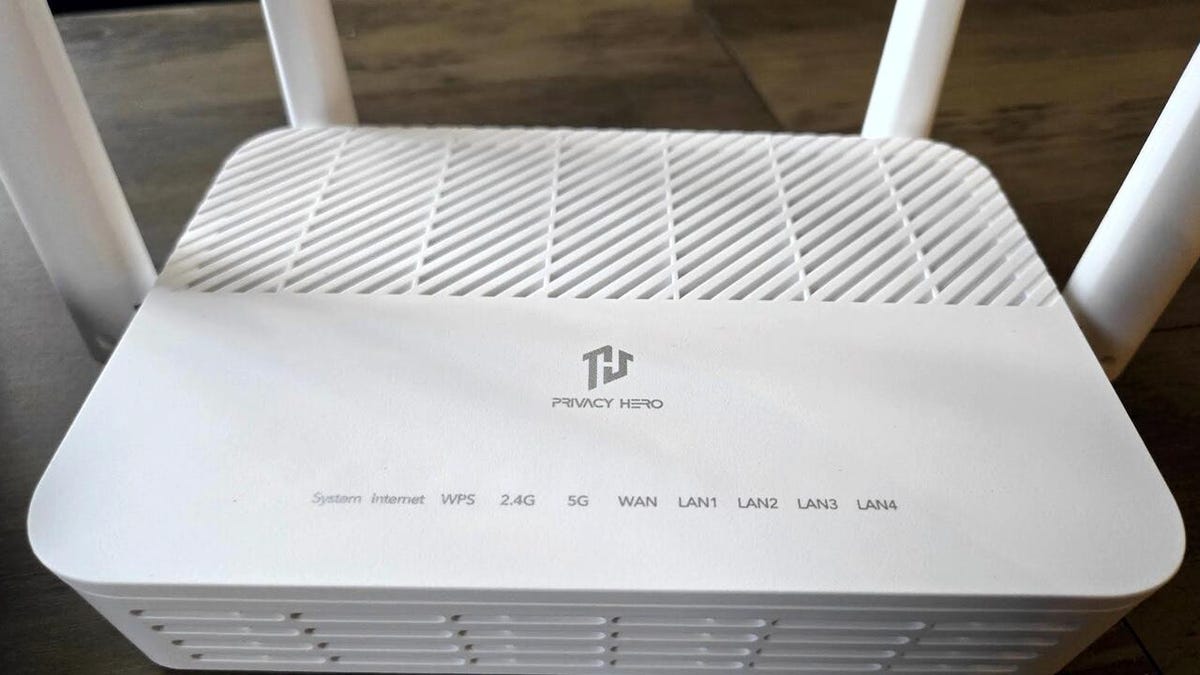
    Privacy Hero 2

    $160

    Up to 3,000Mbps

    Synology RT6600ax

    $330

    Up to 6,600Mbps

    Asus RT-AX1800S

    $70

    Up to 1,000Mbps

    ASUS RT-BE88U

    $300

    7,200Mbps with multi-link operation and 4096-QAM

    GL.iNET Beryl-AX

    $99

    x (setup possible)

    Up to 3,000Mbps

    *Manufacturer’s suggested retail price at the time of publication. Keep in mind that actual prices may differ based on current sales, promotions, discounts, and coupons.

    Show more

    There are pros and cons to both VPN-enabled routers and standalone VPN apps, with the most significant ones listed below.

    VPN router

    VPN app

    A VPN router delivers whole-home coverage for every device on your network.

    A VPN app’s reach is capped by the number of simultaneous connections allowed per account.

    Setting up a VPN router can be tricky, and most routers don’t come with built-in VPN software. You may also void your router’s warranty during installation.

    VPN apps are generally straightforward to install and operate.

    Set it up once, and everything is protected.

    You’ll need to install the VPN app on each device separately.

    VPN protection runs continuously in the background.

    You have to open the VPN app and turn on the service each time.

    A VPN subscription is typically required, and it’s usually a paid one.

    Both free (limited) and paid tiers are generally available.

    Your router needs to be compatible.

    Your computer or mobile device needs to be compatible.

    A VPN router can secure devices without native VPN support, such as smart TVs.

    VPN functionality depends on app availability and operating system compatibility.

    Show more

    A VPN router is either a router that natively supports VPN connections or one that ships with VPN software preinstalled, like ExpressVPN, NordVPN, or Surfshark.

    When shopping for VPN routers, ease of use is a major factor. While many modern routers not marketed as “VPN routers” can still work with VPNs, the setup process varies widely and can be a technically demanding ordeal if you have the wrong hardware.

    Once it’s configured, all of your PCs, laptops, smartphones, smart TVs, gaming consoles, and other internet-connected devices share the same VPN shield. This is especially handy for households with lots of devices on the network.

    Some VPN companies sell routers with the VPN software already installed, though these typically require a subscription.

    Consider a VPN-ready router if you’d rather not manually install software on every device or if you want to make sure every gadget on your Wi-Fi is covered. Just be aware that you could be tied to one VPN provider, making it harder to switch down the road.

    Show more

    By installing a VPN on your router, every device on your network shares the same VPN connection. This provides blanket security and hides your IP address, though the setup can be complex.

    Keep in mind that your router functions as a VPN client rather than a server, passing the VPN connection along to every connected device. Here are some general steps to follow—though exact steps may vary depending on your router and current setup:

    • Verify your router’s compatibility. Not every router can run a VPN natively, but many newer models can.
    • Subscribe to a VPN service. Unless your router includes a built-in VPN, you’ll most likely need a paid plan.
    • Log into your router’s management interface using its IP address.
    • Navigate to the settings and locate the VPN section. Enable the VPN service and choose either a static or dynamic IP address.
    • You can now install the VPN client, though you may need to adjust some network settings along the way.

    For a detailed installation walkthrough, see: How to set up a VPN on your router

    Show more

    Select this VPN router…

    If you’re looking for…

    Privacy Hero 2

    The best overall VPN-ready router. The Privacy Hero 2 is one of the most user-friendly models available, offering solid coverage and speed. It works with NordVPN—one of our top-rated VPNs—and currently comes with a free one-year subscription.

    Synology RT6600ax

    A VPN router that gives you detailed control over your connections, traffic, and networks. This high-performance tri-band router and its companion app will appeal most to users with some technical know-how. A VPN router that gives you granular control over your connections, traffic, and networks. This fast, tri-band router and its accompanying app will appeal the most to those with some technical

    Show more

    knowledge.

    Asus RT-AX1800S

    A budget-friendly VPN and router combo. This device boasts overwhelmingly favorable user reviews and is an incredible bargain at $70 — particularly considering its integrated VPN functionality and extra security features.

    ASUS RT-BE88U

    Blazing speed and top-tier performance. Leverage the wide array of ports and connectivity options to tailor your VPN setup on this dual-band router, which features 10G ports, robust network protection, and native VPN integration.

    GL.iNET Beryl-AX

    Perfect for taking your VPN router on the go. This device ranks among the finest travel-ready, compact routers that work seamlessly with leading VPN providers in 2026, and it’s currently available at a discounted price.

    Show more

    When weighing your options for the ideal VPN router, keep these essential factors in mind before making your decision:

    • DIY versus plug-and-play: If you’re looking to secure your home network with a VPN, think about how confident you feel configuring one directly on your router. DIY setups typically demand a degree of technical expertise and a readiness to modify your router’s settings. If you prefer the most straightforward and hassle-free route, go with a router that comes with a VPN already installed.
    • Preinstalled solutions: Factory-installed VPNs may be proprietary ones developed by the router maker or the product of collaborations with outside VPN companies. While this is undeniably convenient, it could restrict your VPN choices if you depend solely on the router’s built-in option. You might also find yourself locked into a specific provider for six months, a full year, or even longer.
    • Cost considerations: VPN routers span a wide price spectrum, from basic entry-level units to forward-looking, high-end devices that support cutting-edge Wi-Fi standards. If your budget allows, think about investing in a premium VPN router that handles next-generation Wi-Fi and delivers dependable coverage with fast speeds. Bigger homes will require more coverage area, and mesh networking is frequently a smart choice in those situations, since mesh routers can eliminate dead zones.
    • VPN compatibility: You’ll also want to think about which VPN service you plan to use. If you already have a favorite VPN, make sure the router you’re eyeing is compatible with it. Many router manufacturers publish lists of the third-party VPN services they support, along with the available protocols, such as WireGuard.
    • Subscription costs: Chances are you’ll need to buy a subscription, since free VPNs typically restrict how many devices you can connect. Although a few reputable providers offer no-cost VPN plans, most come with significant drawbacks — like supporting only a single device or imposing a monthly data cap. As a result, they’re generally not practical for router-level use. Be sure to account for the expense of a VPN subscription, even if it’s just a basic tier.
    • Additional features: The VPN capability may be your top priority, but it’s worth considering whether other features matter to you as well, such as tri-band operation, gaming-specific optimizations, or supplementary security tools.

    Show more

    While putting together our picks for the top VPN routers of 2026, we assessed each model and weighed several important criteria, including:

    • Speed: There’s little value in purchasing a new router designed for VPN use unless it delivers fast, consistent, and stable internet performance. We sought out models that don’t dramatically reduce your speeds beyond the typical VPN overhead of roughly 5% to 35%.
    • Home coverage area: Coverage matters just as much as speed when it comes to VPN-capable routers. We looked at conventional router designs as well as options offering expandable mesh networking for larger homes that need broader internet reach. It’s a plus when you don’t need to buy extra extenders, but if you do, they should be easy to find.
    • VPN compatibility: We featured a diverse selection of models — some with built-in VPNs, others with standalone VPN support, and portable products for mobile VPN protection. Flexibility is key, since one VPN’s capabilities and setup demands will work well for certain users but not for others.
    • Budget range: We’ve included routers that fit various price points. While security, speed, and reliability were our primary concerns, we also added affordable options that offer dependable VPN support alongside premium, future-proof routers that cost more but deliver elite performance.
    • Manufacturer reputation: We factored in the standing of each router brand, looking at their market popularity, product diversity, and how easily their products can be obtained.
    • User feedback: We also reviewed both positive and negative customer testimonials and incorporated that input into our recommendations. No router is flawless, but we steered clear of any with serious recurring complaints.
    • Tariffs: We’ve made an effort to avoid routers with known shipping complications to the US, though this situation is ever-changing and not always feasible. We opted to exclude tariff-affected routers wherever we could.

    Show more

    Installing a VPN directly on your router can be more involved than simply downloading an app. However, it can also save you considerable time down the road, since every device that connects to your router will automatically route through the VPN and benefit from its protection. This is especially handy for internet-connected devices like smart TVs and IoT gadgets that lack the ability to run VPN software on their own.

    You may want to look into configuring a VPN on your router if you work remotely and have multiple devices that need securing. If you’re a telecommuter, some employers may mandate the use of their corporate VPN to access internal resources.

    Certain online platforms — streaming services in particular — can detect VPN usage and may block your connection. When that happens, you might need to temporarily turn off your VPN service to continue streaming.

    Show more

    Latest news

    While VPN software itself isn’t covered under the current tariff adjustments — at least at the time of this writing — the infrastructure, hardware, and equipment that underpin VPN services likely will be eventually, and those added costs may ultimately be passed on to consumers.

    Regarding

    Show more

    Home routers may see price increases and stock shortages, as many global shipping companies have temporarily halted deliveries to the U.S. due to tariff changes and uncertainty.

    Show more

    Modern routers are smart devices that do much more than just connect you to the internet. Many now support VPN software, and this feature is often highlighted as a key selling point. Before buying, check whether the router supports WireGuard or OpenVPN—these are the most common protocols for managing VPN connections.

    Be aware: Installing third-party software on your router could void its warranty, similar to how jailbreaking a phone does the same.

    Show more

    Yes. “Split tunneling” lets a VPN create separate pathways for your internet traffic—some encrypted through the VPN, others left unencrypted. You can turn on split tunneling in your VPN’s settings.

    Show more

    A VPN is a powerful tool for safeguarding your privacy. At minimum, you should use one when connecting to public Wi-Fi, but making it your default online protection is even better.

    VPNs also help you bypass geographic restrictions, access global streaming libraries, and avoid censorship. In some regions, they can also help you sidestep new online age verification laws.

    At home, installing a VPN on your router gives every connected device automatic protection—laptops, PCs, phones, streaming sticks, and even smart TVs.

    However, some countries ban or strongly discourage VPN use. If it’s illegal where you are, you could face fines or legal action. According to NordVPN’s country guide, Belarus and Iraq prohibit VPNs entirely, while China and Russia only allow government-approved ones.

    Show more

    Yes, but a good VPN shouldn’t slow things down noticeably. That said, expect some speed drop when connecting to distant servers—like from the UK to Australia.

    If you experience major slowdowns even on nearby servers—say, New York to Washington—it might point to an issue with the VPN or your internet provider. Try switching to another nearby server and run a speed test to check.

    Show more

    Sometimes. Some brands, like Asus, include built-in VPN support. But if you want full control over your VPN setup, you’ll likely need a paid subscription.

    VPN providers usually advertise monthly rates, but you typically pay upfront for the full term. For example, a plan listed as $1/month on a yearly contract means you pay $12 at once, plus tax. Many router makers offer the first year free to encourage you to buy their hardware—and stick with their preferred VPN service.

    Longer commitments bring the best savings. Two years is standard, though some providers offer plans lasting three to five years.

    Show more

    VPN prices vary, but most fall between $2 and $5 per month. Monthly plans often cost over $10—this is intentional, pushing users toward longer subscriptions.

    The best value comes with two-year or longer plans. Annual plans offer more flexibility but can run upwards of $5 monthly.

    As a rule: the longer your subscription, the lower the monthly cost.

    Show more

    It’s possible, but it depends. While VPNs encrypt your traffic and hide your activity, company IT admins generally can’t access your home network through your personal VPN. However, if you’re using a work laptop with monitoring software, they may still track your actions and access files on that device.

    Also, if your employer provides or licenses the VPN, they can monitor your usage. Always keep work and personal browsing separate.

    Show more

    Free VPNs—unless offered by your router maker—usually aren’t ideal for routers. They often come with data caps or limited server options, which hurt speed. For whole-home protection, you’ll want a paid plan without these restrictions.

    Show more

    This depends on what you want to use your

    Show more

    VPN for.

    If you want comprehensive protection across all your devices, setting up a router with a VPN is a smart move—it saves you the hassle of installing the VPN on each device individually. Once it’s properly configured, you can simply set it up and let it run, knowing that every device connected to your router is automatically protected.

    On the other hand, installing a VPN directly on each device gives you greater control and flexibility. You can easily access settings, toggle the VPN on or off, pause the service whenever needed, and switch between different servers with ease.

    Show more

    Yes—and this is one of the main reasons people opt for VPN routers.

    Most smart TVs don’t have built-in support for VPNs, so your options are limited to using a router or external hardware like streaming sticks.

    By connecting your VPN to a server in another country, you may be able to access region-locked streaming content—but there’s a catch. Some streaming platforms can detect VPN usage and block your connection, or they might restrict you to content available under universal licensing agreements.

    Show more

    Latest updates

    More VPN routers to consider

    Show less

    GL.iNet GL-MT300N-V2 (Mango)

    GL.iNet

    The Mango, GL.iNet’s compact $30 VPN router, is an affordable and convenient way to secure your connection using WireGuard or OpenVPN when you’re on public Wi-Fi networks away from home.


    Read More

    Show Expert Take Show less

    Show less

    GL.iNet MT2500A (Brume 2)

    GL.iNet

    Another VPN router we recommend is the GL.iNet MT2500A, also known as the Brume 2.

    This model supports both WireGuard and OpenVPN and can also be used to manage VPN connections for accessing work resources. Users find it straightforward to set up and configure, and it’s reasonably priced at $90.


    Read More

    Show Expert Take Show less

    Show less

    Flint 2

    GL.iNet

    The $170 Flint 2 is an excellent alternative if you’re looking for top-tier performance.

    This router supports a variety of VPN protocols, including OpenVPN and WireGuard, and comes with Ethernet ports and AdGuard support. Users consistently praise its speed, reliability, and stable connections.


    Read More

    Show Expert Take Show less

    Show less

    ASUS ZenWiFi BQ16

    ASUS

    If you need a powerful router setup that covers a large home—with VPN support as a convenient built-in feature—the ASUS ZenWiFi BQ16 is a great choice. It’s priced at $1,045, but you get two routers, Wi-Fi 7 connectivity, a built-in VPN, parental controls, and coverage for up to 8,000 square feet.


    Read More

    Show Expert Take Show less

    A VPN-compatible router is one option, but if you’d prefer to stick with apps and direct installation, check out our guides on the best VPNs of 2026, the best VPNs for streaming, and the best free VPNs.

    Share.
    Leave A Reply