



# Introduction
Every time you start a new conversation with Claude, you’re starting completely fresh. Your preferred formatting style, your team’s writing conventions, your industry terminology, and your quality benchmarks — all of it disappears. The first few responses go into context that you have already set up in previous discussions. For a single, one-time question, this is no big deal. But for repetitive, professional tasks, it becomes a recurring burden on every single conversation.
Claude Skills are the solution to that problem. A skill is essentially a folder of instructions that you create once, and Claude pulls in automatically whenever the task at hand calls for it. Your preferences, workflows, and specialist knowledge are baked directly into the skill rather than being dropped into each conversation manually. Skills were released in October 2025 and rapidly became the go-to method for equipping Claude with domain-specific abilities in Claude Code, Claude Desktop, and the Claude API. Anthropic shared the official skills repository at github.com/anthropics/skills as a practical reference for how skills should be put together. As of May 2026, that repository has earned over 141,000 stars and more than 16,000 forks, ranking it among the most popular AI tooling projects on GitHub.
This guide gives you the full picture: what skills are under the hood, how to plan and design them, the precise file structure and naming conventions, how to write instructions that Claude consistently follows, a complete working example built from the ground up, how testing and distribution work, and what to do when something breaks. By the time you finish reading, you’ll be able to build a fully functional skill in a single session — which is exactly what Anthropic’s own documentation promises if you follow the recommended structure.
# What a Skill Really Is
At its core, a skill is just a folder. Inside, you’ll find a SKILL.md file (this is required), along with optional subdirectories: a scripts/ folder for runnable code, a references/ folder for documentation that Claude loads on demand, and an assets/ folder for templates and other supporting files. That’s the full technical breakdown. Skills are not machine learning models, not WordPress-style plugins, and not commercial add-ons. They are open-source markdown-based instructions paired with supporting files. You can browse all of them on GitHub before installing anything.
What gives them their real power is the underlying architecture. Per Anthropic’s official documentation, skills employ a three-level progressive disclosure system that’s purpose-built to keep token consumption low while preserving deep expertise. These levels are:
- YAML frontmatter (metadata): Loaded into Claude’s system prompt at all times, costing roughly 100 tokens per skill no matter how many skills you have installed. This thin metadata layer provides Claude with just enough context to judge whether the skill is relevant to the current task — without pulling in the entire skill content.
- SKILL.md body: Pulled in when Claude determines the skill applies. This holds the full instructions, detailed workflows, examples, and troubleshooting notes.
- Referenced files: Extra files stored in
references/andassets/that Claude accesses only when the specific task demands it. Lengthy API reference docs, granular style specifications, or extended trouble sections go here rather than cluttering the main file. The upshot: you can keep dozens of skills installed at once without bloating Claude’s context window — only the frontmatter of each skill loads by default.
Three core design principles shape the entire framework. Progressive disclosure, as outlined above. Composability — Claude can activate several skills simultaneously, so your skill should cooperate well with others rather than assuming it’s the only capability loaded. Portability — the same skill works identically across Claude.ai, Claude Code, and the API. Build once, run everywhere without changes, as long as the target environment supports any dependencies your skill relies on.
For teams already leveraging Model Context Protocol (MCP) servers, skills introduce a knowledge layer on top of your integrations. To borrow Anthropic’s framing from the official guide: MCP sets up the professional kitchen — giving you access to tools, raw ingredients, and equipment. Skills are the recipes and step-by-step instructions that turn those ingredients into something valuable. MCP tells Claude what it’s capable of. Skills tell Claude how to do things well.
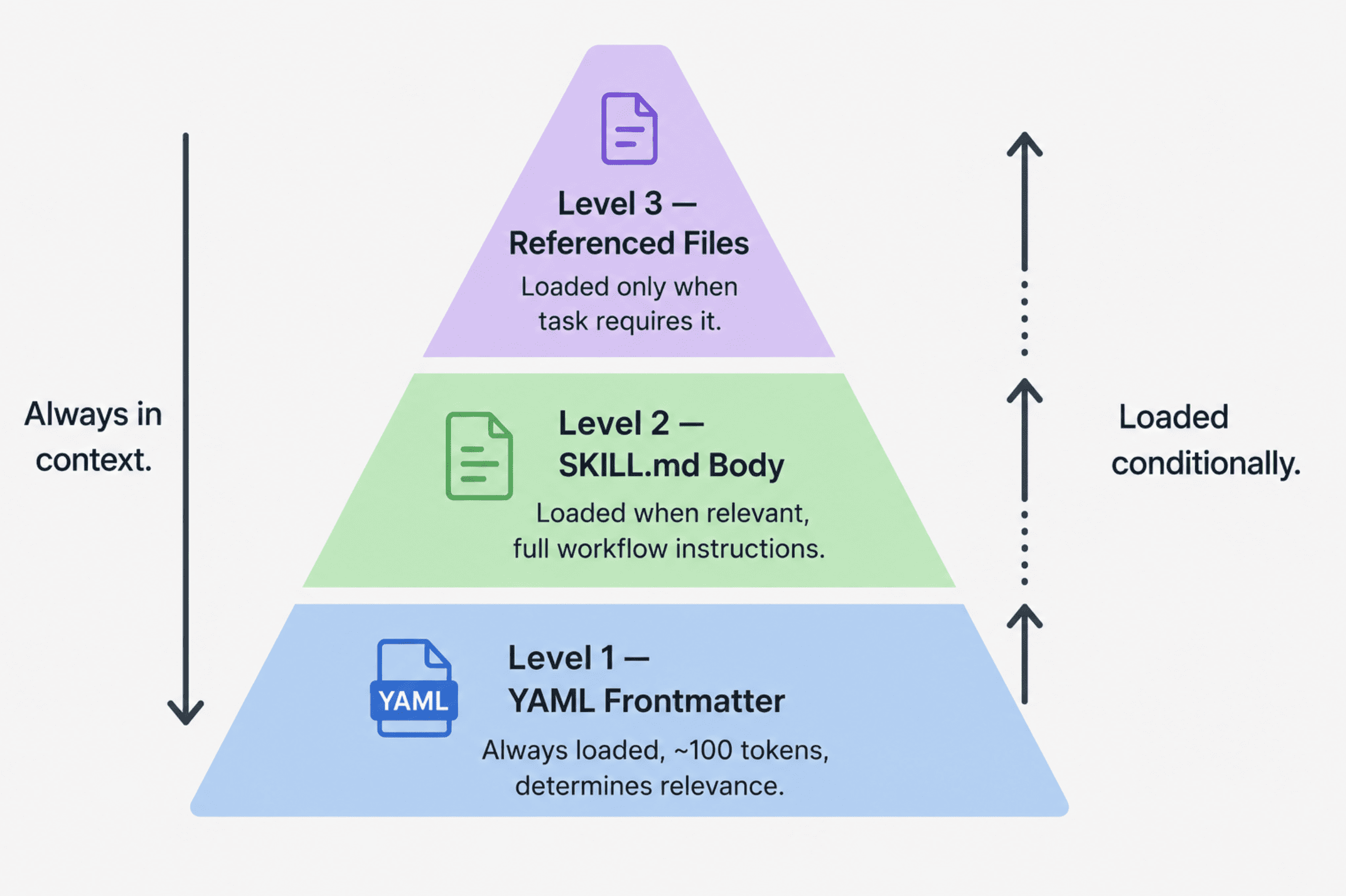
A three-tier pyramid diagram showing progressive disclosure
# Planning Your Skill Before Writing Anything
The most frequent mistake people make when building a skill is jumping straight into the file structure instead of nailing down the use case first. Anthropic’s team is clear on this: define two or three concrete use cases before you touch a single file.
A solid use case answers four questions:
- What is the user trying to achieve?
- What multi-step workflow does that require?
- Which tools are involved — Claude’s built-in capabilities, or MCP-connected services?
- What domain knowledge or best practices should be captured so the user doesn’t have to re-explain them every session?
A well-defined use case looks something like this:
Use Case: Blog Post Drafting
Trigger: User says "write a blog post", "draft content for our blog",
         or "create a post following our style guide"
Steps:
  1. Read the style guide from references/style-guide.md
  2. Confirm the topic and target audience with the user
  3. Draft following the header structure and tone guidelines
  4. Run the quality checklist before delivering the draft
Result: A complete draft that matches the company style guide without
        the user needing to paste guidelines into the chat
According to Anthropic’s observations, three broad categories cover the majority of skill use cases:
- Document & Asset Creation: Producing consistent, polished output — documents, slides, frontend designs, and code. The hallmark of this category is embedded style guides and quality checklists. Claude’s native code execution and document generation handle the output without any external tooling. The official Anthropic repository ships production-level skills, including document-handling skills for
docx,pdf,pptx, andxlsxfiles. Thefrontend-designskill is the go-to example for this category — it bakes in design system tokens and component conventions so every generated interface shares the same visual standards. - Workflow Automation: Multi-step processes that follow a consistent methodology — research pipelines, content workflows, onboarding sequences, and more. The defining techniques are sequential step-by-step workflows with validation checkpoints between stages, templates for repeatable outputs, and error-handling
- MCP Enhancement: Workflow guidance layered on top of a working MCP server. If your users have connected Notion, Linear, or Sentry via MCP but are unsure which workflows to run, an MCP enhancement skill provides the knowledge layer — sequencing tool calls, embedding domain expertise, and handling errors. Sentry’s code review skill, which automatically analyzes and fixes bugs in GitHub pull requests using Sentry’s MCP data, is the reference example from Anthropic’s official guide.
Before writing any SKILL.md content, define your success criteria. Anthropic recommends two types. Quantitative: the skill triggers on at least 90% of relevant queries, completes the workflow in a defined number of tool calls, and produces zero failed API calls per run. Qualitative: users do not need to redirect Claude mid-workflow, outputs are structurally consistent across repeated runs, and a new user can accomplish the task on the first try without guidance. These are rough benchmarks rather than hard thresholds, but defining them upfront gives you something concrete to test against.
# The Technical Requirements
This is where most skills fail silently. The rules are strict, and the errors they produce are confusing because Claude simply will not load a skill that violates them — with no error message to explain why.
// File Structure
your-skill-name/
├── SKILL.md              # Required -- main skill file
├── scripts/              # Optional -- executable code
│   ├── process_data.py
│   └── validate.sh
├── references/           # Optional -- documentation loaded as needed
│   ├── api-guide.md
│   └── examples/
└── assets/               # Optional -- templates, fonts, icons
    └── report-template.md
// Critical Naming Rules
SKILL.mdis case-sensitive. The file must be named exactlySKILL.md. Variations likeskill.md,SKILL.MD, orSkill.mdwill not be recognized. Claude simply will not load the skill — no error, no warning.- Folder names must use
kebab-case. Lowercase letters and hyphens only. No spaces (Notion Project Setup), no underscores (notion_project_setup), no capitals (NotionProjectSetup). The folder name should match thenamefield in your frontmatter exactly. - No
README.mdinside the skill folder. All documentation for Claude goes inSKILL.mdorreferences/. If you are distributing on GitHub, put your human-readable README at the repository root, not inside the skill folder itself. - Reserved names: skill names cannot contain “claude” or “anthropic”; these are reserved by Anthropic and will be rejected.
- No XML angle brackets in frontmatter. Frontmatter appears directly in Claude’s system prompt. XML-like content could inject unintended instructions, so this is a security restriction enforced at the platform level.
// YAML Frontmatter
The frontmatter is how Claude decides whether to load your skill. If it is weak or missing trigger conditions, the skill will not activate reliably. This is the single most common failure mode.
Minimal required format:
---
name: your-skill-name
description: What it does. Use when user asks to [specific phrases].
---- The
namefield must be kebab-case and match the folder name exactly. - The
descriptionfield must include both what the skill does and when to use it. The character limit is 1024. According to Anthropic’s engineering guidance, this field provides just enough information for Claude to know when each skill should be used without loading all of it into context. Descriptions without trigger conditions are the primary reason skills fail to load when they should.
Full format with all optional fields:
---
name: your-skill-name
description: What it does and when to use it. (Under 1024 characters, no XML tags.)
license: MIT
compatibility: Requires Claude Code with Python 3.9+ in the environment.
metadata:
  author: Your Name
  version: 1.0.0
  mcp-server: your-service-name
---licensematters if you are making the skill open source.compatibility(1–500 characters) describes environment requirements; if the skill needs specific system packages, network access, or a particular product surface, document it here.metadataaccepts any custom key-value pairs;author,version, andmcp-serverare the most commonly used.
# Writing Skills That Actually Work
// The Description Field Formula
The structure that consistently produces reliable triggering: [What it does] + [When to use it] + [Key capabilities]. Anthropic’s guide provides clear examples of both good and bad descriptions:
# Good -- specific task, specific trigger phrases, file type mentioned
description: Analyzes Figma design files and generates developer handoff
  documentation. Use when user uploads .fig files, asks for "design specs",
  "component documentation", or "design-to-code handoff".

# Good -- named service, concrete trigger language
description: Manages Linear project workflows including sprint planning,
  task creation, and status tracking. Use when user mentions "sprint",
  "Linear tasks", "project planning", or asks to "create tickets".

# Good -- end-to-end workflow, specific trigger phrases
description: End-to-end customer onboarding workflow for PayFlow. Handles
  account creation, payment setup, and subscription management. Use when
  user says "onboard new customer", "set up subscription", or
  "create PayFlow account".
Bad descriptions fail on specificity or omit triggers entirely:
# Poor -- lacks clarity and no activation triggers
description: Provides assistance with design files.

# Poor -- missing trigger phrases and unclear purpose
description: Automates workflow tasks.

# Poor -- only names the domain, omits task and activation details
description: Intended for PayFlow subscribers.
// Crafting the Main Instructions Section
Below the frontmatter, compose your instructions using Markdown formatting. Here’s the structure Anthropic suggests:
# Name of the Skill

## Guidance

### Phase 1: [Initial Major Action]
Straightforward description of the process and its purpose.

bash
python scripts/retrieve_data.py --project-id PROJECT_ID


Desired outcome: [describe what a successful result appears like]

## Sample Scenarios

### Scenario 1: [Typical use case]
**User request**: "Launch a fresh marketing campaign"
**Steps taken:**
Retrieve current campaigns through MCP
Generate new campaign using supplied details
**Outcome:** Campaign generated with activation link included

## Issue Resolution

### Issue: [Frequent error notification]
**Root cause:** [What triggers this problem]
**Remedy:** [Walkthrough for resolving it sequentially]
Four approaches ensure instructions perform reliably:
- Be precise and directive — provide exact commands paired with anticipated outcomes rather than general suggestions.
- Account for potential errors across all predictable failure scenarios.
- Point to accompanying files with precise locations so Claude can locate them easily.
- Employ layered detail — keep
SKILL.mdcentered on essential steps and relocate in-depth documentation toreferences/with a reference link, enabling Claude to access the supplementary material only when the work calls for it.
# A Fully Functional Skill Example
Below is a complete, production-ready skill built for a content creator who needs Claude to apply their organization’s article style guide seamlessly — across all sessions, without needing to paste the rules into each conversation.
Directory setup:
blog-content-writer/
├── SKILL.md
├── references/
│   └── style-guide.md
└── assets/
    └── post-template.md
// Complete SKILL.md File
---
name: blog-content-writer
description: Generates blog posts aligned with the company's style guide.
  Engaged when the user mentions "compose a blog entry", "prepare blog content",
  "produce a post", "craft content for our tech blog", or any request
  to develop long-form articles for publishing. Ensures uniformity in voice, tone,
  heading arrangement, and layout throughout. Covers B2B SaaS subjects,
  technical how-tos, and expert commentary.
license: MIT
compatibility: Compatible with Claude.ai and Claude Code; no external requirements.
metadata:
  author: Content Team
  version: 1.1.0
---

# Blog Content Writer

Generates blog entries that align with the company style guide, removing the
need for writers to paste rules into every conversation. Retrieves the style guide
from references/ and enforces consistency across all drafts.

---

## Instructions

### Phase 1: Retrieve the Style Guide

Before composing anything, open `references/style-guide.md` to access the latest
voice, tone, layout, and structure expectations. Avoid depending on past session
memory -- always retrieve the newest version to incorporate any guideline changes.

### Phase 2: Confirm the Details

If the user's request is missing any of the essential elements below, request them
prior to beginning -- all at once, not individually:

- **Subject:** What theme will the post address?
- **Intended readers:** Are they developers, company leaders, or general professionals?
- **Length preference:** Brief (500-800 words), moderate (1,000-1,500 words), or extended (2,000+)?
- **Key objective:** Is the aim to educate, convince, encourage signups, or build credibility?

### Phase 3: Compose the Draft

With the details confirmed, compose the post following the guidelines from
`references/style-guide.md`:

- Opening approach: engaging hook → background → commitment (refer to style guide for models)
- Heading organization: H2 for primary sections, H3 reserved for subsections only
- Sentence rhythm: blend concise (under 12 words) with moderate-length (12-22 words)
- Paragraph structure: 2-4 sentences per paragraph, single-sentence paragraphs avoided
- Tone: straightforward & active; jargon only when readers are confirmed technical

Execute the quality review in Phase 4 before finalizing.

### Phase 4: Quality Review

Before releasing the draft, validate each criterion. Resolve any issues ahead of
delivery -- never release a draft containing known review failures.

□ Does the opening follow the hook → background → commitment approach?
□ Are every H2 headings expressed as a clear claim or inquiry, never generic labels?
□ Do all paragraphs contain 2-4 sentences?
□ Is passive constructions scarce or absent?
□ Is the closing actionable -- guiding readers on their next move?
□ Does the post maintain focus on the single subject outlined in the brief?
□ Is the word count within 10% of the target?

### Phase 5: Deliver with Summary

Present the draft followed by an overview block:

Draft overview:
- Word count: [actual count]
- Target: [target count]
- Audience: [confirmed from brief]
- Review status: All 7 criteria met / [flag any exceptions with reasoning]

---

## Scenarios

### Scenario 1: Complete brief -- move straight to drafting

**User says:** "Compose a 1,200-word blog post on why B2B teams should embrace
async documentation approaches, aimed at developers."

**Steps taken:**
1. Retrieve `references/style-guide.md`
2. Brief is thorough -- move to draft without requesting clarifications
3. Apply developer-focused tone: precise, active, code illustrations appropriate
4. Execute quality review -- resolve any issues before finalizing
5. Present draft with overview block

**Outcome:** ~1,200-word draft accompanied by overview confirming all review criteria met

### Scenario 2: Partial brief -- request details first

**User says:** "Create a blog post about our updated pricing structure."

**Steps taken:**
1. Retrieve `references/style-guide.md`
2. Brief is incomplete -- intended readers, length, and purpose are unspecified
3. Request: "Glad to compose this. Before I begin -- who should this reach
   (current clients, potential buyers, or both)? What length are you aiming for?
   And what action should readers take after reading?"
4. Await responses before composing any draft content

**Outcome:** Clarification requests delivered in a single message

---

## Issue Resolution

### Issue: Draft voice or tone feels off

**Root cause:** The style guide reference may have been revised since the skill was last validated,
or the brief lacked sufficient detail about the intended audience.

**Remedy:**
1. Access `references/style-guide.md` and verify it reflects the current
# Skill Troubleshooting Guide
## Problem: Style Guide Not Being Applied
**Cause:** The guidelines may not be loaded or configured correctly.
**Solution:** First verify the reference file path is accurate, then confirm the skill body explicitly instructs Claude to read the style guide. If both are correct, isolate the exact paragraph that violates a guideline and point to the specific rule that’s been broken. This creates a clear revision target instead of an ambiguous fix request.
—
## Problem: Skill Doesn’t Activate on Its Own
**Cause:** The user’s query phrasing may not match the trigger words in the skill description.
**Solution:** Use explicit trigger phrasing like “Write a blog post about X following our style guide.” Or invoke it directly: “Use the blog-content-writer skill to draft…” Once verified working, direct invocation is no longer required.
—
## Problem: Quality Checklist Failures Keep Happening After Revisions
**Cause:** There may be conflicting guidance between the creative brief and the style guide.
**Solution:** Pinpoint the exact contradiction before requesting another revision. For instance: “The brief asks for a casual tone, but the style guide mandates formal — which one takes priority for this piece?” Clear up the conflict first.
—
> **References:** `references/style-guide.md`
This file illustrates progressive disclosure in action. It loads only when the skill body tells Claude to read it — keeping the primary context window streamlined while ensuring detailed guidelines are accessible when genuinely needed.
—
# Company Blog Style Guide
**Version 1.1 — May 2026**
This file loads automatically whenever the `blog-content-writer` skill handles a blog post draft. To update styling standards, simply edit this file — no changes to `SKILL.md` are needed.
—
## Voice and Tone
– **Voice:** Confident, direct, and grounded. Write the way a knowledgeable colleague would explain something to a peer — neither academic nor promotional.
– **Adjust tone by audience:**
| Audience | Approach |
|—|—|
| Developers | Technical accuracy, active verbs, code samples encouraged |
| Executives | Results-oriented, minimal implementation detail, lead with impact |
| General business | Plain language, define every technical term on first mention |
– **Never use:** Passive voice, hedging language (“it could be argued that”), buzzwords (“leverage,” “synergize,” “operationalize”), or vague superlatives (“best-in-class,” “cutting-edge”).
—
## Structure
**Introduction formula — Hook, Context, Promise:**
1. **Hook:** One sentence that names the problem or reveals a surprising fact.
2. **Context:** Two or three sentences on why this matters right now.
3. **Promise:** One sentence spelling out exactly what the reader will walk away with.
**Heading rules:**
– **H2:** Must make a specific claim or pose a question — never use a generic label.
– *Works:* “Why async documentation cuts onboarding time by 40%”
– *Doesn’t work:* “Benefits of async documentation”
– **H3:** Only when a section contains three or more distinct subtopics.
– **No H4 or deeper:** If you need that many levels of nesting, restructure instead.
**Closing:** End with a concrete action the reader can take within the next 24 hours. Avoid vague promptings like “let us know your thoughts.”
—
## Formatting
– **Paragraphs:** 2–4 sentences each. Avoid single-sentence paragraphs; rarely go to five.
– **Sentence length:** Alternate intentionally — mix short sentences (under 12 words) with medium-length ones (12–22 words). Never exceed 30 words in a single sentence.
– **Bold:** Reserve for key terms or phrases that carry real weight — not for decoration.
– **Code blocks:** Always use for code snippets, commands, and configuration values, even short ones.
– **Lists:** Only use when items are truly parallel and discrete — not as a substitute for connective prose.
—
Now that everything is set up, let’s install and test it.
### Claude.ai
– Compress the `blog-content-writer/` directory into a `.zip` file.
– Navigate to **Settings → Capabilities → Skills**.
– Upload the `.zip` file.
– Test with this query: *”Write a blog post about remote work culture for a general business audience.”*
### Claude Code — Global Install
bash
# Set up the global skills directory
mkdir -p ~/.claude/skills
# Copy the skill into place
cp -r blog-content-writer/ ~/.claude/skills/
# Verify
ls ~/.claude/skills/
### Claude Code — Project-Level Install
bash
# Set up the project-level skills directory
mkdir -p ./.claude/skills
# Copy the skill into place
cp -r blog-content-writer/ ./.claude/skills/
# Verify
ls ./.claude/skills/
—
After installation, test by explicitly invoking the skill on the first run:
“Use the blog-content-writer skill to draft a 1,000-word post about
async documentation practices for a developer audience.”
Once you confirm it activates properly, the direct invocation step becomes optional — the skill will load on its own whenever Claude recognizes a matching task.
—
# Testing Your Skill
Anthropic’s official documentation scales testing approaches to the skill’s deployment scope. Fast manual testing in Claude.ai requires zero setup and speeds up iteration. Scripted testing in Claude Code gives repeatable validation across revisions. And for comprehensive evaluation suites, the **Skills API** supports programmatic testing.
A skill powering a small internal team has very different requirements than one serving thousands of users — pick your testing method accordingly.
**Key tip from the official guide:** Start by iterating on a single difficult task until Claude nails it, then codify that winning approach into the skill itself. Resist the urge to chase broad coverage upfront. Nail one hard case, then expand outward.
Three areas to focus on:
### 1. Trigger Testing
Confirm the skill loads when it should and stays dormant when it shouldn’t. Build a test matrix before shipping:
SHOULD TRIGGER:
“Write a blog post about our product launch”
“Draft content for the engineering blog”
“Create a post following our style guide”
“I need a,1–1,500-word piece on async communication for developers”
SHOULD NOT TRIGGER:
“Summarize this article for me”
“Help me fix this Python function”
“Write an email to the sales team”
“Create a presentation about Q4 results”
Run 10–20 queries from the “Should trigger” list and track how many activate the skill without explicit invocation. Target **90%+ automatic triggering** on relevant requests.
### 2. Output Quality Testing
Run the same prompt three to five times and compare structural consistency across outputs. Stress-test edge cases: a topic with no clear resolution, conflicting instructions in the brief, or an unreasonably short or long word count target. After any edit to `SKILL.md` or `references/style-guide.md`, re-run the full test matrix before shipping updates.
### 3. Regression Testing
The most common regression: a description edit that narrows triggers too aggressively and breaks queries that previously worked. Always re-run every “Should trigger” test after any frontmatter change.
Before distributing your revised skill, run your full should-trigger test suite from start to finish.
# Sharing Your Skill with Others
For individual use, download the skill folder, compress it into a zip archive if necessary, then upload it through Settings > Capabilities > Skills on Claude.ai — or place it into the correct Claude Code skills directory using the commands described earlier.
For team-wide rollouts, administrators handle deployment across the entire workspace. This includes automatic updates and centralized oversight — a feature released on December 18, 2025. Once an admin deploys a skill at the organization level, every team member’s Claude instance loads it automatically with no manual installation required.
GitHub is the go-to method for sharing skills with the broader community. One important structural guideline: place your human-readable README.md at the repository’s root level, not inside the skill folder itself. Your installation instructions should point users to the Claude Code plugin command:
# Add the repository as a marketplace
/plugin marketplace add your-org/your-repo

# Install a particular skill from that marketplace
/plugin install your-skill-name@your-marketplace-name
Anthropic released Agent Skills as an open specification at agentskills.io. The standard is built for portability — the same SKILL.md format is intended to function seamlessly in Claude as well as any other AI platform that chooses to adopt it. Anthropic’s official repository serves as the authoritative source for folder structure, naming conventions, and quality benchmarks.
# Frequent Issues and How to Resolve Them
Below is a quick-reference guide covering the most commonly encountered problems:
| Issue | Probable Cause | Solution |
|---|---|---|
| Skill never activates | Unclear description or absent trigger phrases | Revise the description using precise, user-facing terminology |
| Skill fires too often | Description is too broadly worded | Include explicit “Do NOT use when” exclusion criteria |
| Instructions are disregarded | Directives are ambiguous or contradictory | Be precise: specify exact commands and expected outputs |
| MPC calls don’t work | Server is offline or authentication has lapsed | Add reconnection procedures to the troubleshooting section |
| Functions in Claude.ai but breaks in Code | Required environment dependencies are missing | List prerequisites in the compatibility field |
| Output varies between sessions | Instructions leave too much room for interpretation | Include a quality checklist and mandate self-verification |
# Final Thoughts
Skills are how you transform domain expertise and workflow knowledge into something Claude retains and applies — not as context you paste in repeatedly every session, but as a ready-to-use capability that kicks in when the situation calls for it. The underlying architecture is deliberately straightforward: a folder, a markdown file, and optional supporting resources. Where the real craft comes in is how precisely you articulate what you want Claude to accomplish, not in the tooling itself.
The official Anthropic walkthrough estimates you can build a functional skill in 15–30 minutes using the skill-creator meta-skill, available in the official repository. It guides you interactively through each step. Begin with one well-defined use case. Establish your trigger conditions before drafting instructions. Verify triggering behavior before assessing output quality. Then refine against the single most challenging task in your use case until it performs reliably — and codify that approach within the skill. Everything else builds outward from there.
Shittu Olumide is a software engineer and technical writer passionate about harnessing cutting-edge technologies to craft engaging narratives, with a sharp eye for detail and a talent for distilling complex concepts into accessible language. You can also connect with Shittu on Twitter.
