



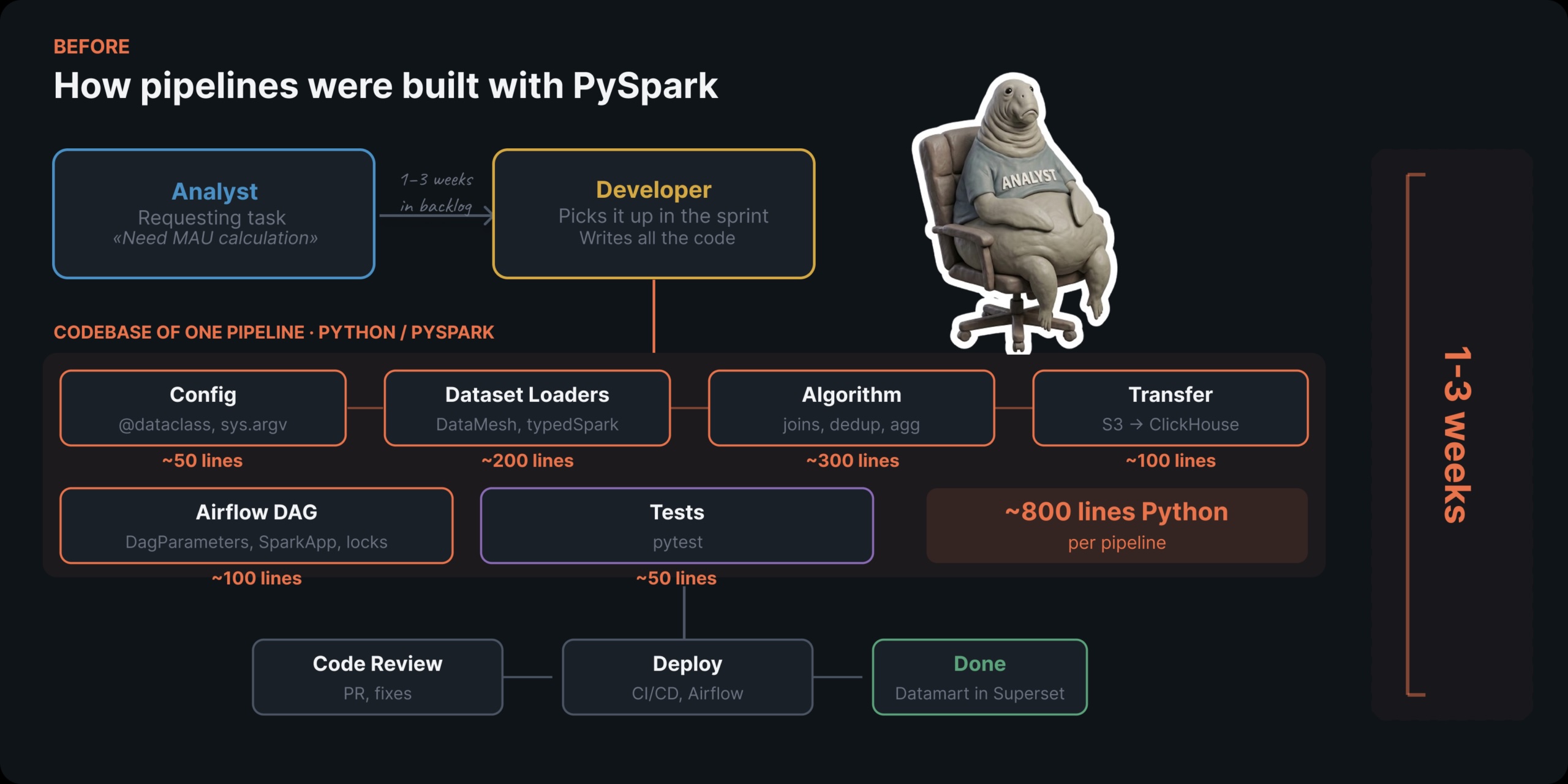
It used to take us three weeks to deliver a single data pipeline. Now, an analyst without any Python background can do it in just one day. Here’s the story of how we made that happen.
My name is Kiril Kazlou, and I work as a data engineer at Mindbox. Our team is responsible for regularly recalculating business metrics for our clients — which means we’re always building data marts for billing and analytics, pulling data from a wide variety of sources.
For a long time, we depended on PySpark for all of our data processing needs. The catch? Working with PySpark effectively requires solid Python skills. Every new pipeline needed a dedicated developer. And that meant long waits — sometimes stretching into weeks.
In this article, I’ll walk you through how we created an internal data platform that lets an analyst or product manager set up a regularly refreshed pipeline by writing just four YAML files.
Why PySpark Was Holding Us Back
Let me paint the picture with a classic example — computing MAU (Monthly Active Users).
At first glance, this looks like a straightforward SQL task: a COUNT(DISTINCT customerId) across a handful of tables over a given time range. But once you factor in all the infrastructure overhead — PySpark setup, Airflow DAG configuration, Spark resource tuning, testing — it had to be handed off to a developer. The outcome? A full week just to ship a single MAU counter.
Every new metric took anywhere from one to three weeks to deliver. And the workflow was always the same:
- An analyst gathered the business requirements, tracked down an available developer, and passed along the context.
- The developer asked follow-up questions, wrote PySpark code, went through code review, set up the DAG, and pushed it to production.
What we really wanted was for analysts and product managers — the people who know the business logic inside and out and are comfortable with SQL and YAML — to handle this on their own. No Python. No PySpark.
What We Swapped PySpark For: Just YAML and SQL
To go fully declarative, we broke our data layer into three layers and chose the best tool for each:
- dlt (data load tool) — pulls data from external APIs and databases into object storage. Everything is configured through a YAML file. No coding needed.
- dbt (data build tool) on Trino — handles all data transformations using plain SQL. It connects models with
ref(), automatically builds a dependency graph, and manages incremental updates. - Airflow + Cosmos — takes care of orchestration. The Airflow DAG is generated automatically from
dag.yamland the dbt project.
We were already running Trino as our query engine for ad-hoc analysis and had it connected to Superset for BI reporting. It had already proven its worth: for queries with standard logic, it handled large datasets faster and with less resource consumption than Spark. On top of that, Trino natively supports federated queries across multiple data stores from a single SQL statement. For 90% of our pipelines, Trino was the ideal choice.

How We Load Data: dlt.yaml
The first YAML file defines where the data comes from and how it should be loaded for downstream use. Here’s a real example — pulling billing data from an internal API:
product: sg-team
feature: billing
schema: billing_tarification

dag:
  dag_id: dlt_billing_tarification
  schedule: "0 4 * * *"
  description: "Daily refresh of tarification data"
  tags:
    - billing

alerts:
  enabled: true
  severity: warning

source:
  type: rest_api
  client:
    base_url: "
    auth:
      type: bearer
      token: dlt-billing.token
  resources:
    - name: tarification_data
      endpoint:
        path: /tarificationData
        method: POST
        json:
          firstPeriod: "%- set months_back = var('months_back', 5) "
          lastPeriod: " int -%"
          pricingPlanLine: CurrentPlan
      write_disposition: replace
      processing_steps:
        - map: dlt_custom.billing_tarification_data.map

    - name: charges_raw
      columns:
        staffUserName:
          data_type: text
          nullable: true
      endpoint:
        path: /data-feed/charges
        method: POST
        json:
          firstPeriod: "{{ previous_month_date }}"
          lastPeriod: "{{ previous_month_date }}"
      write_disposition: replace

    - name: discounts_raw
      endpoint:
        path: /data-feed/discounts
        method: POST
        json:
          firstPeriod: "{{ previous_month_date }}"
          lastPeriod: "{{ previous_month_date }}"
      write_disposition: replace
This configuration defines four resources from a single API. For each one, we specify the endpoint, request parameters, and a write strategy — in our case, replace means “overwrite on every run.” You can also attach processing steps, define column types, and set up alerts.
The entire configuration is just 40 lines of YAML. Without dlt, each connector would have been a custom Python script dealing with HTTP requests, pagination, retries, serialization into Delta Table format, and uploads to storage.
How We Transform Data With SQL: dbt_project.yaml and sources.yaml
The next step is setting up the dbt model. With Trino, that boils down to writing SQL queries.
Here’s an example of how we configured the MAU calculation. This is what event preparation from a single source looks like:
-- int_mau_events_visits.sql (simplified)
{{ config(materialized='table') }}

WITH period AS (
    -- Rolling window: last 5 months to current
    SELECT
        YEAR(CURRENT_DATE - INTERVAL '5' MONTH) AS start_year,
        MONTH(CURRENT_DATE - INTERVAL '5' MONTH) AS start_month,
        YEAR(CURRENT_DATE) AS end_year,
        MONTH(CURRENT_DATE) AS end_month
),

events AS (
    -- Pull visit events within the period window
    SELECT src._tenant, src.unmergedCustomerId,
           'visits' AS src_type, src.endpoint
    FROM {{ source('final', 'customerstracking_visits') }} src
-- int_mau_events_inapps_targetings.sql (one of 10 sources)
WITH events AS (
    SELECT
        src._tenant,
        src.unmergedCustomerId,
        'inapps' AS src_type,
        src.targetingId AS endpoint,
        src.event_datetime
    FROM {{ source('final', 'inapps_targetings_v2') }} src
    CROSS JOIN period p
    WHERE src.unmergedCustomerId IS NOT NULL
      AND /* ...timestamp restrictions by year/month range... */
),

events_with_customer AS (
    -- Map original customer IDs to consolidated IDs
    SELECT e._tenant,
           COALESCE(mc.mergedCustomerId, e.unmergedCustomerId) AS customerId,
           e.src_type, e.endpoint
    FROM events e
    LEFT JOIN {{ ref('int_merged_customers') }} mc
      ON e._tenant = mc._tenant
      AND e.unmergedCustomerId = mc.unmergedCustomerId
)

-- Filter to include only active (non-deleted) customers
SELECT ewc._tenant, ewc.customerId, ewc.src_type, ewc.endpoint
FROM events_with_customer ewc
WHERE EXISTS (
    SELECT 1 FROM {{ ref('int_actual_customers') }} ac
    WHERE ewc._tenant = ac._tenant
      AND ewc.customerId = ac.customerId
)
Every one of the 10 event sources uses an identical structure. The variations lie only in the input table and its specific filters. These models then feed into a unified stream:
-- int_mau_events.sql (combined output from all sources)
SELECT * FROM {{ ref('int_mau_events_inapps_targetings') }}
UNION ALL
SELECT * FROM {{ ref('int_mau_events_inapps_clicks') }}
UNION ALL
SELECT * FROM {{ ref('int_mau_events_visits') }}
SELECT * FROM {{ ref('int_mau_events_orders') }}
-- ...plus 6 additional sources
Next comes the data mart where all metrics are rolled up:
-- mau_period_datamart.sql
{{ config(
    materialized='incremental',
    incremental_strategy='merge',
    unique_key=['_tenant', 'start_year', 'start_month', 'end_year', 'end_month']
) }}

 int -%

WITH period AS (
    SELECT
        YEAR(CURRENT_DATE - INTERVAL '{{ months_back }}' MONTH) AS start_year,
        MONTH(CURRENT_DATE - INTERVAL '{{ months_back }}' MONTH) AS start_month,
        YEAR(CURRENT_DATE) AS end_year,
        MONTH(CURRENT_DATE) AS end_month
),
events_resolved AS (
    SELECT * FROM {{ ref('int_mau_events') }}
),
metrics_by_tenant AS (
    SELECT
        er._tenant,
        COUNT(DISTINCT CASE WHEN src_type = 'visits'
              THEN customerId END) AS CustomersTracking_Visits,
        COUNT(CISTINCT CASE WHEN src_type = 'orders'
              THEN customerId END) AS ProcessingOrders_Orders,
        COUNT(DISTINCT CASE WHEN src_type = 'mailings'
              THEN customerId END) AS Mailings_MessageStatuses,
        -- ...other measures
        COUNT(DISTINCT customerId) AS MAU
    FROM events_resolved er
    GROUP BY er._tenant
)
SELECT m.*, p.start_year, p.start_month, p.end_year, p.end_month
FROM metrics_by_tenant m
CROSS JOIN period p
For the data mart, we use incremental_strategy='merge'. dbt produces the merge query on its own, applying the unique_key to handle upserts. There’s no need to hand-code incremental loading logic.
To bind every model into one coherent project, we define dbt_project.yaml:
name: mau_period
version: '1.0.0'

models:
  mau_period:
    +on_table_exists: replace
    +on_schema_change: append_new_columns
Alongside sources.yaml, which lays out the input tables:
sources:
  - name: final
    database: data_platform
    schema: final
    tables:
      - name: inapps_targetings_v2
      - name: inapps_clicks_v2
      - name: customerstracking_visits
      - name: processingorders_orders
      - name: cdp_mergedcustomers_v2
      # ...
The outcome is the same business logic we once had in PySpark, now expressed entirely in SQL: sources.yaml takes the place of typedspark schemas, {{ ref() }} and {{ source() }} replace .get_table(), and the automatic dependency graph eliminates the need for manual Spark resource configuration.
Setting Up Airflow Through dag.yaml
The fourth configuration file controls the scheduling and execution of the pipeline within Airflow:
product: sg-team
feature: billing
schema: mau
schedule: "15 21 * * *"  # runs daily at 00:15 MSK

params:
  - name: start_date
    description: "Start date (YYYY-MM-DD). Leave blank for automatic"
    default: ""
  - name: end_date
    description: "End date (YYYY-MM-DD). Leave blank for automatic"
    default: ""
  - name: months_back
    description: "Number of months to look back (default: 5)"
    default: 5

alerts:
  enabled: true
  severity: warning
After that, our Python script reads dag.yaml and dbt_project.yaml, then leverages the Cosmos library to produce a complete Airflow DAG. This is the sole Python component in the whole architecture. It’s authored once and reused across all dbt projects. Here’s the core:
def _build_dbt_project_dags(project_path: Path, environ: dict) -> list[DbtDag]:
    config_dict = yaml.safe_load(dag_config_path.read_text())
    config = DagConfig.model_validate(config_dict)

    # YAML params mapped to Airflow Params
    params = {}
    operator_vars = {}
    for param in config.params:
        params[param.name] = Param(
            default=param.default if param.default is not None else "",
            description=param.description,
        )
        operator_vars[param.name] = f"{{{{ params.{param.name} }}}}"

    # Cosmos builds the DAG from the dbt project
    with DbtDag(
        dag_id=f"dbt_{project_path.name}",
        schedule=config.schedule,
        params=params,
        project_config=ProjectConfig(dbt_project_path=project_path),
        profile_config=ProfileConfig(
            profile_name="default",
            target_name=project_name,
            profile_mapping=TrinoLDAPProfileMapping(
                conn_id="trino_default",
                profile_args={
                    "database": profile_database,
                    "schema": profile_schema,
                },
            ),
        ),
        operator_args={"vars": operator_vars},
    ) as dag:
        # Ensure the schema exists before model execution
        create_schema = SQLExecuteQueryOperator(
            task_id="create_schema",
            conn_id="trino_default",
            sql=f"CREATE SCHEMA IF NOT EXISTS {profile_database}.{profile_schema} ...",
        )
        # Link to root-level tasks
        for unique_id, _ in dag.dbt_graph.filtered_nodes.items():
            task = dag.tasks_map[unique_id]
            if not task.upstream_task_ids:
                create_schema >> task
Cosmos reads manifest.json from the dbt project, interprets the model dependency graph, and generates an individual Airflow task for each model. Dependencies between tasks are constructed automatically based on ref() references in the SQL code.
How Analysts Construct Pipelines Without Developer Help
When an analyst needs to set up a new recurring pipeline, the process breaks down into a handful of steps:
Step 1. Add a directory in the repo: dbt-projects/my_new_pipeline/.
Step 2. If pulling in external data, draft a YAML config for dlt.
Step 3. Author SQL models inside the models/ folder and define the sources in sources.yaml.
Step 4. Set up the dbt_project.yaml and dag.yaml configuration files.
Step 5. Commit your changes to Git, submit them for review, and merge once approved.
The CI/CD pipeline automatically builds the dbt project and uploads the output artifacts to S3. Airflow then pulls the DAG files from S3, and Cosmos interprets the dbt project to construct the task execution graph. On each scheduled run, dbt executes the models on Trino in the proper dependency order. The final outcome is a refreshed data mart in the warehouse, ready for exploration through Superset.
How Things Look After the Migration

To empower analysts to build pipelines independently, they first need to grasp a handful of core concepts — how ref() and source() work, the distinction between table and incremental materialization strategies, and the fundamentals of Git. We conducted several internal workshops and created detailed, step-by-step guides covering each type of task.
Why PySpark Still Has a Role
For roughly 10% of our pipelines, PySpark remains the only viable choice — specifically when a transformation can’t be expressed in SQL. dbt does offer Jinja macros, but they’re not a true replacement for the flexibility of Python. And it wouldn’t be fair to gloss over the shortcomings of the newer tooling.
dlt + Delta: upsert support is still experimental. Our storage layer relies on the Delta format. The dlt Delta connector carries an experimental label, which means the merge strategy didn’t function without modifications. We had to devise workarounds — in some cases switching from merge to replace (giving up incremental processing), and in others writing custom processing_steps.
Trino’s fault tolerance has real limits. Trino does offer a fault tolerance mode, but it achieves this by spilling intermediate results to S3. Given our terabyte-scale datasets, this approach isn’t practical — the volume of S3 operations drives costs to unreasonable levels. With fault tolerance disabled, if any Trino worker crashes, the entire query fails. Spark handles this more gracefully by simply retrying the failed task. We worked around this by adding retries at the DAG level and breaking complex models into sequences of lighter intermediate steps.
UDFs and custom logic are harder to manage. With Spark, you can embed custom Python logic directly inside your pipeline — it’s straightforward and flexible. The new architecture makes this considerably more difficult. dbt running on Trino doesn’t solve the problem: Jinja templates only produce SQL, and dbt’s Python model support is limited to Snowflake, Databricks, and BigQuery. Trino does allow UDFs, but they must be written in Java — which brings its own overhead: a separate repository, a dedicated build pipeline, and deploying JAR files to every worker node. So when a transformation resists being written in SQL, you’re left choosing between an unwieldy SQL monstrosity or a standalone script that breaks the data lineage.
Looking Ahead: Tests, Templates, and Training
Strengthening our test coverage. Our PySpark setup had thorough pipeline testing, but the new architecture is still maturing in this area. Recent dbt releases have introduced unit testing capabilities — you can now verify SQL model logic against mock data without running the full pipeline. We plan to integrate dbt tests both at the individual model level and as an independent monitoring layer.
Building reusable templates for recurring patterns. A large number of our dbt models follow the same structural pattern. A single configuration could define a dozen models that share the same logic — differing only in their source tables and filter conditions. We intend to consolidate this shared logic into dbt macros.
Growing the platform’s community of users. We want more engineers and analysts to work with data on their own terms. To make that happen, we’re planning recurring internal training sessions, comprehensive documentation, and onboarding guides so newcomers can ramp up quickly and start building their own models.
If your team is caught in the same cycle where analysts are constantly waiting on developers, I’d be curious to hear how you’re tackling it. Feel free to reach out to me on LinkedIn — let’s trade experiences.
All images in this article were created by the author unless otherwise credited.
