



# Managing KubeVirt Virtual Machines as Bare-Metal Hosts Using Metal3 and KubeVirtBMC
## Introduction
KubeVirtBMC is a tool that provides virtual BMC (Baseboard Management Controller) endpoints for KubeVirt virtual machines, enabling them to respond to out-of-band management protocols like IPMI and Redfish. While sending raw commands to a virtual BMC is useful for testing, the true value of KubeVirtBMC emerges when it is integrated with production-grade bare-metal provisioning frameworks. This article demonstrates a complete end-to-end workflow: using Metal3 to provision and manage KubeVirt VMs exactly as though they were physical servers. Every step can be replicated in your own cluster.
## The Metal3 Framework
Metal3 is a CNCF Incubating project that brings bare-metal host lifecycle management into Kubernetes. At its core, Metal3 relies on OpenStack Ironic to perform hardware discovery, boot device configuration, and OS image deployment. The primary abstraction is the `BareMetalHost` custom resource: you declare a BMC address, credentials, and a target OS image, and Metal3 orchestrates everything else.
The lifecycle of a `BareMetalHost` typically follows these stages: registration, inspection, preparation, availability, provisioning, and provisioned. Metal3 communicates with BMCs using either IPMI or Redfish protocols. Physical servers include built-in BMC hardware, but virtual machines do not—unless a virtual BMC is provided. That is precisely where KubeVirtBMC fills the gap.
## Demo Environment Overview
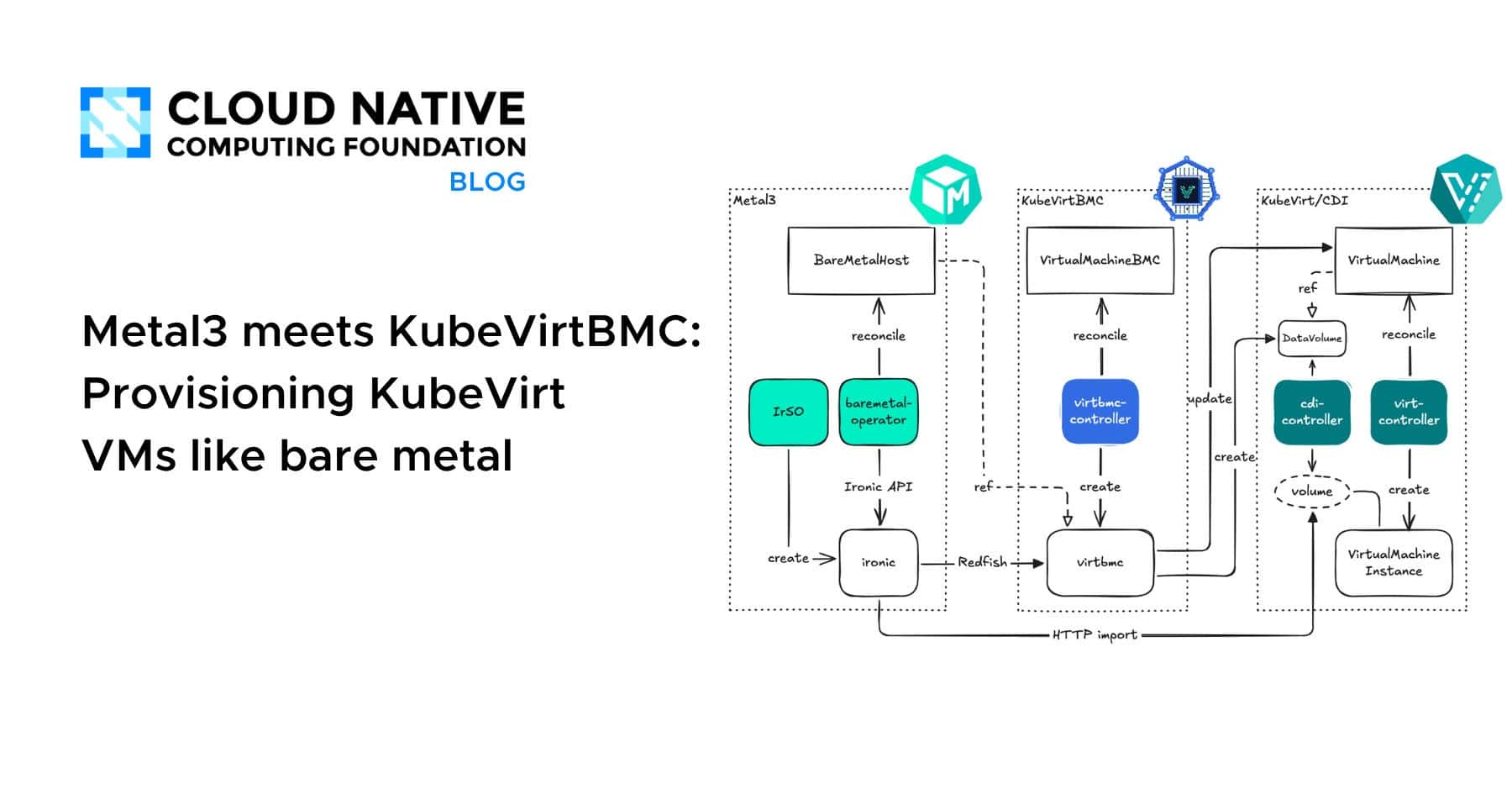
The entire demo runs within a single Kubernetes cluster. Metal3 manages `BareMetalHost` resources that reference the virtual BMC endpoints exposed by KubeVirtBMC. When Metal3 instructs Ironic to power on a host or attach a boot image, Ironic sends Redfish requests to the KubeVirtBMC service. The BMC pod translates those requests into Kubernetes API calls that control the corresponding KubeVirt VM. From Metal3’s perspective, it is interacting with a standard physical server.
**Key components in the architecture:**
– A Kubernetes cluster with virtualization capabilities (nested virtualization or bare metal)
– KubeVirt for VM lifecycle management
– A storage provider for persistent VM disks
– KubeVirtBMC providing virtual BMC services
– Metal3 (Bare Metal Operator + Ironic) handling bare-metal provisioning
## Prerequisites
Before beginning, ensure you have the following in place:
– A Kubernetes cluster with virtualization support (nested virtualization or bare metal hardware)
– A fully operational KubeVirt installation
– A storage provider capable of supplying persistent volumes for VM disks
– `kubectl`, `helm`, and `kustomize` installed on your local machine
If a cluster is not yet available, KubeVirt CI environments or platforms like Harvester can serve as quick starting points.
—
## Step-by-Step Walkthrough
### Step 1: Install cert-manager
Both KubeVirtBMC and Metal3 components depend on cert-manager for webhook certificate generation. Install it with Helm:
“`bash
helm upgrade –install cert-manager oci://quay.io/jetstack/charts/cert-manager
–namespace=cert-manager
–create-namespace
–set=crds.enabled=true
“`
### Step 2: Deploy KubeVirtBMC
Install KubeVirtBMC via Helm:
“`bash
helm upgrade –install kubevirtbmc kubevirtbmc
–repo=
–namespace=kubevirtbmc-system
–create-namespace
“`
Confirm the controller manager is running:
“`bash
kubectl get pods -n kubevirtbmc-system
“`
You should see the `kubevirtbmc-controller-manager` pod in a `Running` state.
### Step 3: Create a KubeVirt VM with BMC Capabilities
We need a VM that mimics a bare-metal server. It requires a persistent disk, a network interface, and it must start in a powered-off state so Metal3 can control its full lifecycle.
**Create a PVC for the VM’s root disk:**
“`yaml
apiVersion: v1
kind: PersistentVolumeClaim
metadata:
name: metal3-demo-vm-disk
namespace: default
spec:
accessModes:
– ReadWriteOnce
resources:
requests:
storage: 20Gi
“`
**Create the VirtualMachine with `runStrategy: Halted`:**
This keeps the VM powered off until Metal3 activates it. Include a CD-ROM device so KubeVirtBMC can attach virtual media (ISO images) via Redfish later. Pinning the MAC address to `02:00:00:00:00:01` is critical because Metal3 requires a `bootMACAddress` for each `BareMetalHost`, and it must correspond to an actual NIC on the machine. BIOS firmware is used here for simplicity, though UEFI can be substituted if the provisioning image demands it.
### Step 4: Configure the VirtualMachineBMC
Create a `VirtualMachineBMC` resource and a Kubernetes Secret containing BMC credentials. Once the BMC is ready, retrieve its ClusterIP service address. The service is accessible within the cluster at `
“`bash
kubectl wait –for=condition=Ready virtualmachinebmcs demo-bmc –timeout=60s
kubectl get services -l kubevirt.io/virtualmachinebmc-name=demo-bmc
“`
The resulting service exposes both HTTP (port 80) and IPMI Redfish-over-LAN (port 623) endpoints.
### Step 5: Install the Metal3 Stack
Metal3 comprises two main components: the Bare Metal Operator (BMO) and Ironic. The recommended approach for new installations is the Ironic Standalone Operator (IrSO), which simplifies deployment.
**Install IrSO and deploy Ironic:**
Clone the IrSO repository and apply the manifests. Ironic requires TLS certificates and API credentials for secure communication. Use cert-manager to generate self-signed certificates within the `baremetal-operator-system` namespace, and create a Secret containing explicit credentials.
The Ironic custom resource should be configured with the following key settings:
– `spec.apicredentialsname` pointing to the credentials Secret
– `spec.networking.disableHostNetwork: true` to use in-cluster DNS resolution
– `spec.tls.disableVirtualMediaTLS: true` because dynamically generated provisioning images are served over plain HTTP by the BMC component
– Version pinning for stability
Wait for Ironic to reach a `Ready` condition before proceeding.
**Install the Bare Metal Operator:**
Clone the baremetal-operator repository and create a kustomization overlay that configures BMO to connect to the in-cluster Ironic service. Build and apply the overlay, then verify that all Metal3 pods are running:
“`bash
kubectl get pods -n baremetal-operator-system
“`
You should see both the BMO controller manager and the Ironic service pod in a healthy state.
### Step 6: Register the VM as a BareMetalHost
This is the pivotal step. Create a `BareMetalHost` resource whose BMC address points to the KubeVirtBMC service endpoint. Metal3 does not know it is talking to a virtual BMC—it only sees a standard Redfish interface.
Key configuration details for the `bmc.address` field:
– Use `redfish-virtualmedia` as the driver to enable virtual media support (ISO boot instead of PXE)
– Append `+http` to the protocol prefix because the BMC pod serves Redfish over plain HTTP by default; omitting this causes Ironic to attempt HTTPS, which will fail
– The host portion should be the in-cluster service FQDN and port created by KubeVirtBMC
– Append the standard Redfish system path `/redfish/v1/Systems/1`
The `bootMACAddress` must match the pinned MAC address configured on the VirtualMachine’s network interface in Step 3.
Watch the `BareMetalHost` progress through its lifecycle stages. During registration, Ironic verifies BMC credentials. During inspection, it boots an IPA (Ironic Python Agent) ramdisk via virtual media to discover hardware details such as CPU, memory, disk, and NIC configuration. Once inspection completes, the host transitions to `available`.
### Step 7: Provision an Operating System Image
With the host discovered and available, provision it using an OS image. Two approaches are demonstrated:
**Live ISO approach:** Boot the VM from an ISO image via virtual media. This is ideal for site-specific installers where Metal3 simply boots the ISO and delegates installation to the process running inside it. No checksum is required for live ISO images.
“`bash
kubectl patch bmh metal3-demo-vm –type=merge -p ‘{
“spec”: {
“image”: {
“url”: “
“format”: “live-iso”
}
}
}’
“`
**Direct disk image approach:** For typical Metal3 workflows, write a qcow2 or raw image directly to disk with an auto-detected checksum.
Monitor provisioning progress. The host transitions from `provisioning` to `provisioned` once the image has been written and the VM has booted successfully. Throughout this process, Metal3 and Ironic use standard Redfish calls; KubeVirtBMC translates them into Kubernetes API operations on the VirtualMachine resource; and KubeVirt handles the actual VM lifecycle.
### Step 8: Verify and Clean Up
Confirm the final state: the `BareMetalHost` should be `provisioned` and the VirtualMachine should be `Running`. To deprovision the host (wipe it and return it to the available pool), remove the image reference from the `BareMetalHost` spec. To clean up all resources, delete the `BareMetalHost`, `VirtualMachineBMC`, Secrets, VirtualMachine, and PVC in the correct dependency order.
—
## Common Pitfalls and Best Practices
– **MAC address mismatch:** Always pin the MAC address on the VirtualMachine interface and reference the same address in the `BareMetalHost` spec. KubeVirt generates random MACs by default, which breaks Ironic’s host matching during inspection.
– **HTTP vs HTTPS:** KubeVirtBMC serves Redfish over plain HTTP by default. Always include `+http` in the BMC address URL to prevent Ironic from defaulting to HTTPS.
– **Virtual media vs network boot:** The `redfish-virtualmedia` driver requires no PXE, DHCP, or provisioning network. If using the standard `redfish` driver instead, a full provisioning network with DHCP must be configured.
– **Host networking:** By default, IrSO deploys Ironic with host networking enabled, which is necessary for the IPA ramdisk inside VMs to reach Ironic. Disabling host networking in this demo relies on in-cluster DNS, which works when all components share a cluster but may require adjustments in multi-cluster or complex network topologies.
– **Cross-cluster deployments:** When Metal3 and KubeVirtBMC run in separate clusters, expose KubeVirtBMC services externally using Ingress or NodePort, and update the BMC address in the `BareMetalHost` accordingly.
—
## Frequently Asked Questions
**Q: Can KubeVirtBMC be used with other bare-metal provisioning tools besides Metal3?**
A: Yes. Because KubeVirtBMC exposes standard Redfish and IPMI endpoints, any tool that communicates with a BMC using these protocols should be compatible. Metal3 is the primary use case demonstrated here, but the approach generalizes to any Redfish or IPMI-based management stack.
**Q: Why is the VM set to `runStrategy: Halted` instead of `Started`?**
A: Setting the VM to a halted state allows Metal3 to manage the complete power lifecycle from the beginning. Metal3 powers the VM on when it is ready for inspection and provisioning, mimicking how physical servers behave when they arrive in a data center powered off.
**Q: Is this setup suitable for production workloads?**
A: This integration is designed primarily for testing, CI/CD pipelines, developer environments, and demonstration purposes. While the underlying technologies are production-grade, the virtual BMC approach introduces an additional layer of abstraction. Evaluate your specific requirements and performance tolerances before deploying in production scenarios.
**Q: What happens if the BMC service pod restarts?**
A: KubeVirtBMC is a Kubernetes-native deployment, so the BMC service is managed by standard Kubernetes controllers. If the pod restarts, the service endpoint remains stable and Metal3 can reconnect. The VM’s state is preserved independently of the BMC pod.
**Q: Can I use UEFI firmware instead of BIOS for the VM?**
A: Yes. The demo uses BIOS for simplicity, but switching to UEFI is straightforward by updating the firmware and bootloader settings in the VirtualMachine spec. Ensure your provisioning image supports UEFI boot as well.
**Q: What are the networking requirements for the `redfish-virtualmedia` driver?**
A: None beyond standard cluster networking. Since the `redfish-virtualmedia` driver uses virtual media (ISO attachment) for booting rather than PXE, there is no need for a dedicated provisioning network, DHCP servers, or PXE infrastructure.
—
## Conclusion
The integration of KubeVirtBMC with Metal3 demonstrates that virtual machines can be seamlessly managed through the same bare-metal provisioning workflows used for physical hardware. By exposing virtual BMC endpoints that speak standard Redfish and IPMI protocols, KubeVirtBMC bridges the gap between virtualized and bare-metal environments within Kubernetes.
This approach unlocks several practical benefits: CI/CD pipelines for bare-metal tools can run integration tests against VMs instead of maintaining physical server fleets; developers iterating on provisioning features can spin up test environments in seconds rather than minutes; and training and demonstration scenarios no longer require dedicated hardware racks—a single Kubernetes cluster with KubeVirt is sufficient.
The project is actively under development, with ongoing work to improve Redfish compatibility and extend BMC feature coverage. Contributions, feedback, and issue reports are welcome and help drive the project forward.
Thank you for reading
