




A hands-on guide to deploying a self-hosted, read-only AI agent within a Kubernetes cluster, with the entire CI/CD pipeline managed through GitHub Actions and Argo CD Image Updater. Nothing leaves the cluster, and no external AI service is required.
Why a Cluster-Aware Agent Is Worth Your Attention
The majority of “AI for Kubernetes” solutions today are cloud-hosted services that gather cluster data from outside and deliver recommendations. The AI model runs remotely. Your data traverses the network boundary.
This guide explores the reverse approach: an agent that operates within the cluster, monitors live conditions through the Kubernetes API, and draws conclusions using a locally running large language model. Every component stays transparent, every credential has narrow scope, and the sole outbound network call happens when the model is pulled at startup.Key characteristics that make this pattern appealing for platform teams:
| Characteristic | What it delivers |
| Cluster-native awareness | The agent interrogates live pods, recent events, and actual logs — reasoning about the real state of affairs rather than generic Kubernetes knowledge. |
| Built-in read-only access | A purpose-built ServiceAccount and ClusterRole restricted to get and verbs. The agent can inspect but never modify the cluster, no matter what the model produces. |
| Just a standard K8s workload | The agent ships as a Deployment, Service, and PersistentVolumeClaim. No proprietary runtime, no operator, no custom scheduler. |
| Fully GitOps-driven | Prompts, model configurations, and RBAC policies all live in a Git repository. Argo CD reconciles them automatically. Every behavioral change is traceable through the commit history. |
LLM vs. AI Agent: A Crucial Difference
A large language model draws exclusively on patterns learned during training. It possesses no awareness of where it’s deployed or what’s happening around it. An agent, as the term is used here, takes one extra step before reasoning: it inspects the actual environment and weaves that observation directly into its prompt.
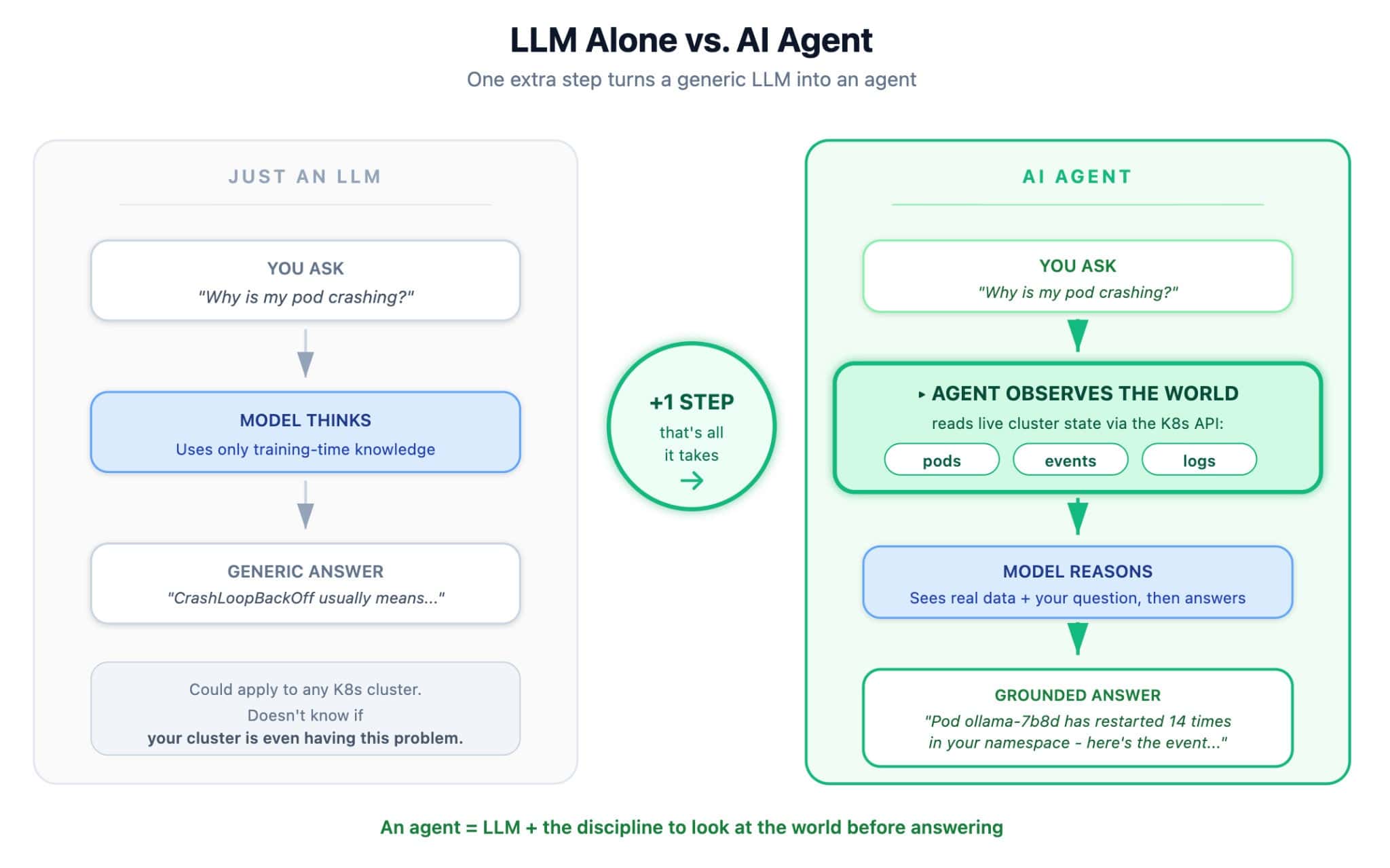
The difference in output is tangible. A bare LLM query yields something like “CrashLoopBackOff typically indicates that the container is failing its health checks or exiting unexpectedly…” An agent query responds with “Pod api-7b8d has restarted 14 times in the past hour due to ImagePullBackOff when pulling from registry.local. Run kubectl describe pod api-7b8d to investigate further.”
The second response is grounded in reality. The first one is accurate but not directly useful for this particular cluster.
This project exposes both modes through two separate REST endpoints:
POST /ask— the LLM on its own, handy for general questions like “What is a StatefulSet?”POST /diagnose— the full agent: it reads live cluster state, then reasons over it
System Architecture
The setup divides into two logical layers: a CI/CD delivery pipeline on top and a Kubernetes runtime at the bottom.
Runtime layer:
- An Ollama pod hosts a local Mistral 7B model, serving it on port 11434
- A FastAPI pod exposes the agent’s HTTP API and chat interface on port 8000
- A
PersistentVolumeClaimstores the model weights so they don’t need to be re-downloaded each time - A dedicated
ServiceAccountattached to the FastAPI pod carries aClusterRolethat grants read-only access to pods, events, logs, services, and deployments
Delivery layer:
- Pushing application source code to the Git repository triggers GitHub Actions, which builds a multi-architecture container image (
linux/amd64andlinux/arm64) tagged with the first 7 characters of the commit SHA - Argo CD Image Updater (from argoproj-labs) checks Docker Hub every 2 minutes, identifies new tags matching a configured regular expression, and writes the updated tag back into the repository’s
kustomization.yaml - Argo CD detects the manifest change and synchronizes the cluster to match
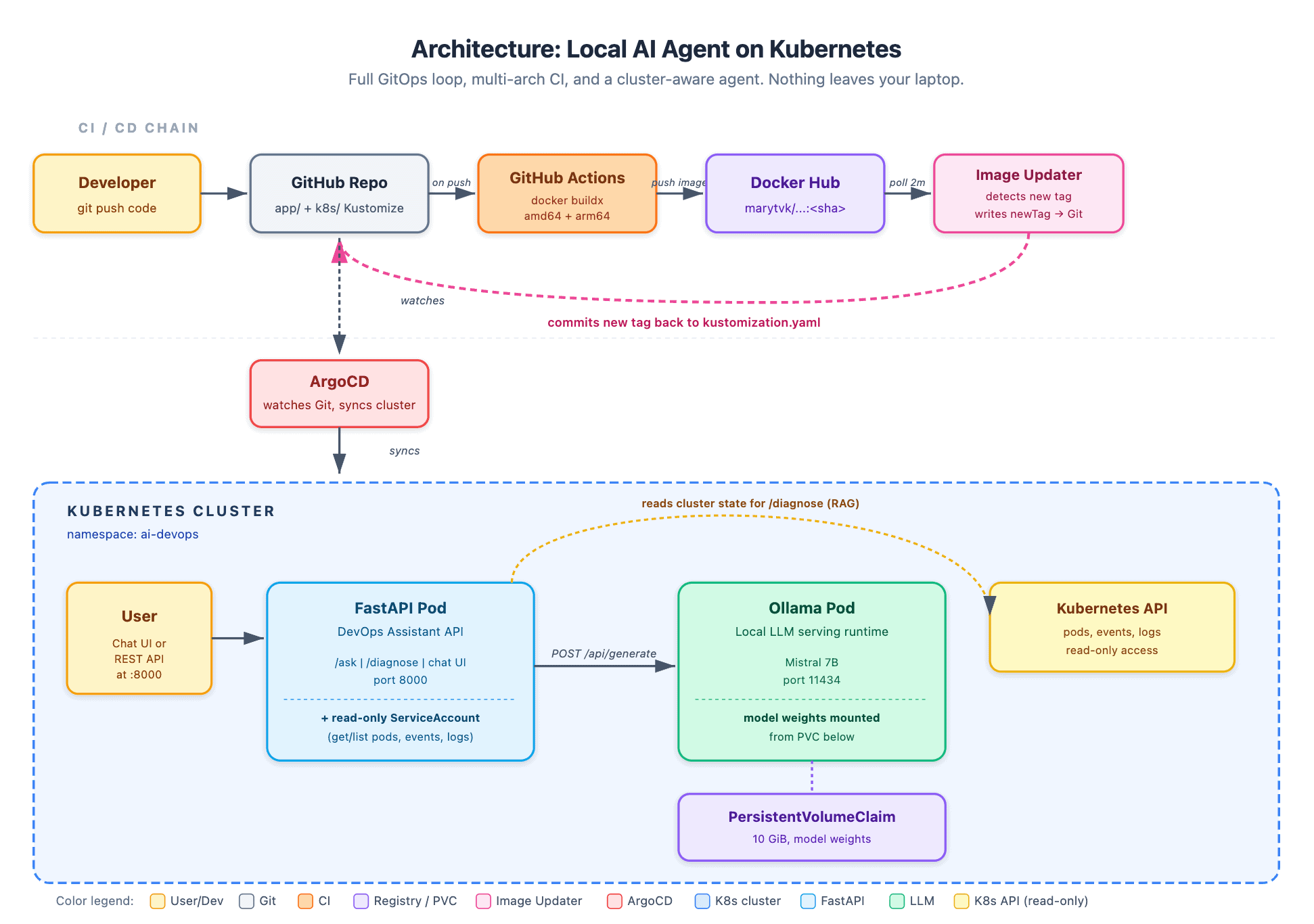
The two layers operate independently. Argo CD has no knowledge of the container registry. GitHub Actions has no visibility into the cluster. Image Updater serves as the lightweight bridge between them, and it does so by committing changes to Git — which keeps a single, auditable source of truth.
The AI Concepts You’ll Interact With
Below are several key concepts that every AI engineer works with daily, broken down into simple terms.
1. LLM (Large Language Model)
A probabilistic model trained on vast quantities of text. It doesn’t truly “know” facts; rather, it predicts the most probable next word based on everything that preceded it. That’s the entire mechanism. The remarkable part is that performing this straightforward task at enormous scale yields something that mimics reasoning.
This project leverages Mistral 7B, an open-source model with 7 billion parameters. “Parameters” are the numerical values the model learned during training — think of them as the connection strengths in a neural network.
2. Local LLM
Most commercial AI services forward your text to a remote cloud provider. The compromise is power: a local 7B model doesn’t match the breadth of a massive cloud-hosted foundational model. However, for experimentation and learning, it’s more than capable. And critically, nothing ever leaves your own network.
3. Ollama (The Model Serving Runtime)
Ollama is not an AI model itself. It’s a server that runs AI models. Picture it as a web server dedicated to LLMs: it downloads model files, loads them into memory, and exposes a REST API on port 11434 so that anything — including our FastAPI application — can submit prompts and receive responses.
Without Ollama, you’d be wrestling with PyTorch, CUDA, and tokenizer libraries directly. With it, running an LLM boils down to an ollama pull mistral command followed by an HTTP POST request.
4. System Prompt (The Personality)
This is arguably the most crucial AI concept for application developers, and you can grasp it in roughly ten minutes.
A system prompt is the set of instructions you provide to the model before the user’s question arrives. The model reads these instructions first and uses them to shape every subsequent response.
In our project, the system prompt for the /ask endpoint is:
“You are a DevOps assistant specializing in Kubernetes.
When presented with an error or question, you:
1. Explain what it means in clear terms
2. Provide the exact kubectl commands to diagnose or resolve it
3. Explain why the fix works
Be concise and practical.”
Without that prompt, Mistral behaves as a general-purpose assistant. With it, Mistral transforms into a Kubernetes specialist that consistently returns structured, focused answers. No retraining was required. This technique is called prompt engineering, and it’s the foundation of nearly every AI product in use today.
5. RAG (Retrieval-Augmented Generation)
The technical term for what the /diagnose endpoint does. RAG means: before querying the model, fetch real-world data and enrich the prompt with it.
RAG is what makes modern AI assistants effective. A code assistant reads your local repository; our agent reads your live cluster state. Same architectural pattern, different data source.
Here’s where the “agent” concept truly justifies its name.
Mode 1: Ask (LLM alone)
You pose a question, FastAPI prepends the system prompt, and forwards it to Ollama. The model generates an answer based on its training data. This is useful for general Kubernetes questions like “What is a StatefulSet?”
Mode 2: Diagnose Cluster (a true agent)
You provide a question along with a namespace. FastAPI takes a new step: it calls the Kubernetes API and gathers:
All pods within that namespace (phase, restart count, waiting reason)
The last 10 events
The last 20 lines of logs from any pod not in a Running state
That entire snapshot is injected into the prompt. Mistral then reasons — but now it’s reasoning about your actual cluster, not generic Kubernetes knowledge.
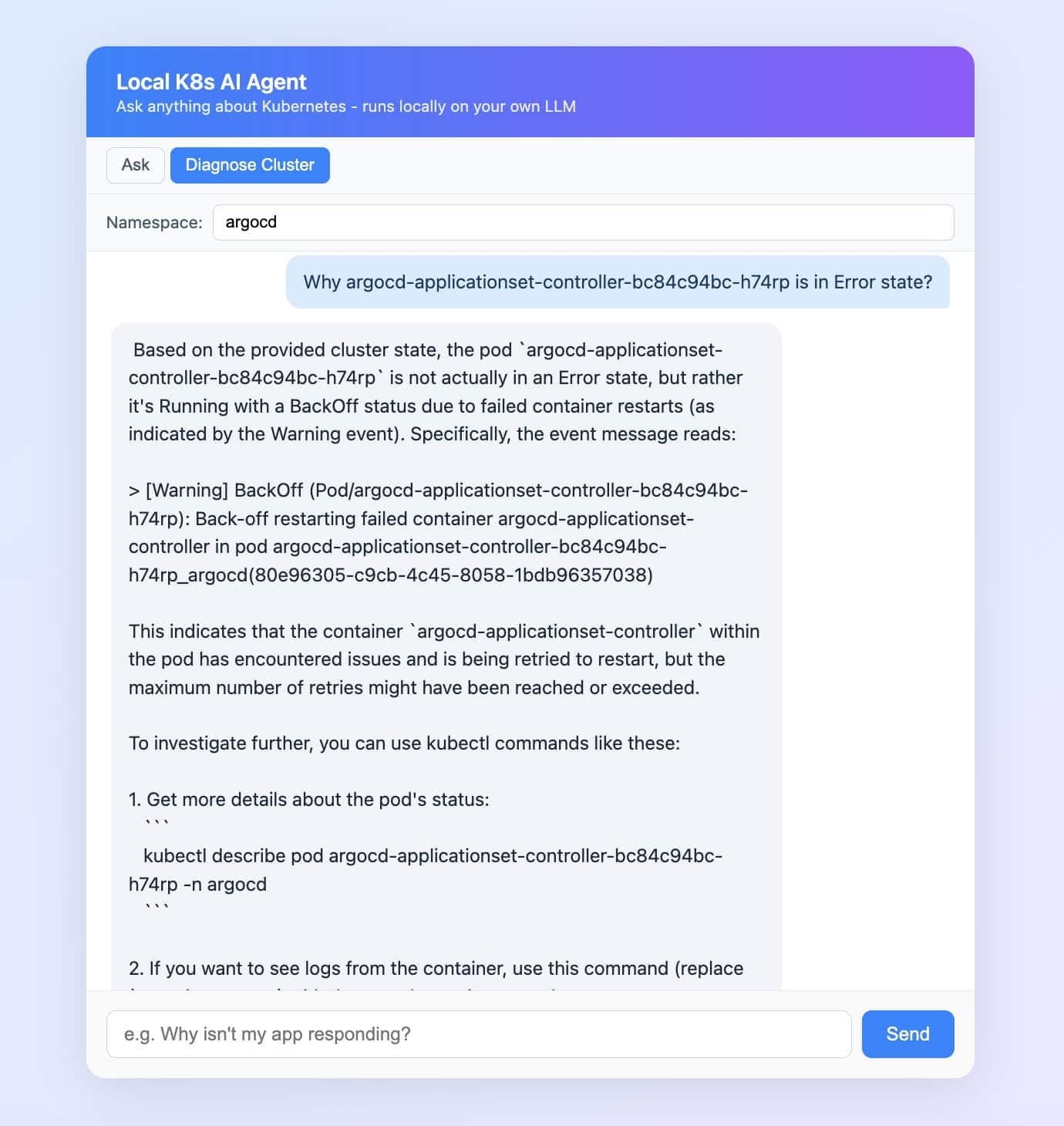
The chat UI even displays the exact context the agent retrieved, in a collapsible panel beneath each answer.
Read-Only by Design
The agent operates under a ServiceAccount tied to a ClusterRole that grants only read-level verbs:
apiVersion: rbac.authorization.k8s.io/v1
kind: ClusterRole
metadata:
  name: ai-devops-api-reader
rules:
  - apiGroups: [""]
    resources: ["pods", "pods/log", "events", "services", "configmaps", "namespaces"]
    verbs: ["get", "list"]
  - apiGroups: ["apps"]
    resources: ["deployments", "replicasets", "statefulsets", "daemonsets"]
    verbs: ["get", "list"]
This is the most critical architectural decision in the project, and its principle extends well beyond AI workloads. An agent that can delete pods based on its own reasoning is a production incident waiting to happen. Hallucinations combined with write access are a dangerous mix.
Read-only RBAC flips the trust model on its head. The agent is permitted to make mistakes because mistakes carry no consequences. The Kubernetes API server enforces the boundary; the LLM’s output simply cannot bypass it. Iterating on prompts and models becomes inexpensive because the worst-case behavior is inherently constrained.
The same approach scales gracefully: begin every agent in read-only mode, then grant each additional capability one verb at a time, each governed by its own RBAC rule and review process.
The CI/CD Pipeline in Detail
The delivery side of the architecture relies on three independent components, each with a single, well-defined responsibility.
GitHub Actions builds and pushes the container image. The workflow uses docker buildx with QEMU emulation to produce a multi-arch manifest list covering both linux/amd64 (GitHub-hosted runners) and linux/arm64 (Apple Silicon developer machines). The image tag is the 7-character commit SHA — an immutable reference.
Argo CD Image Updater polls the container registry every 2 minutes. Its configuration lives in an ImageUpdater Custom Resource that specifies the target Argo CD Application, the image to track, an allowTags regex (^[0-9a-f]{7}$), and the update strategy (newest-build). When a new matching tag is detected, the operator rewrites the newTag field in k8s/kustomization.yaml and commits the change to the main branch.
apiVersion: argocd-image-updater.argoproj.io/v1alpha1
kind: ImageUpdater
metadata:
  name: local-k8s-ai-agent
  namespace: argocd
spec:
  writeBackConfig:
    method: git
    gitConfig:
      branch: main
      writeBackTarget: "kustomization:."
  applicationRefs:
    - namePattern: "local-k8s-ai-agent"
      images:
        - alias: api
          imageName: marytvk/local-k8s-ai-agent
          commonUpdateSettings:
            updateStrategy: newest-build
            allowTags: "regexp:^[0-9a-f]{7}$"
Argo CD watches the repository and reconciles the cluster state on every commit. Because the source manifests are managed by Kustomize, Argo CD applies the rendered output, which now includes the updated image tag.
Try It Yourself: A Starting Point, Not a Final Destination
The repository is located at: github.com/MaryamTavakkoli/local-k8s-ai-agent
Step-by-step setup instructions with exact commands are provided in the README. The total time from git clone to a working chat UI is approximately 30 minutes (most of that is the Mistral model download).
To bring this article full circle: if you’re a DevOps or Platform Engineer who’s been hearing that “AI agents are the future” and wondering what that actually looks like in practice, this project is designed to be your entry point, not your finish line. Once you’ve seen the agent loop in action, you’ll be in a far stronger position to explore further.
The reason for starting locally isn’t that local is always the right choice. It’s to understand how the entire system works behind the scenes.
